





pg_upgrade to Postgres 19: 2 Seconds of Downtime, Timed
Tested November, 2026 on PostgreSQL 18.7 and 19.0 (PGDG packages) · Tested by M. Aziz, backend engineer at Selfhost.dev ·
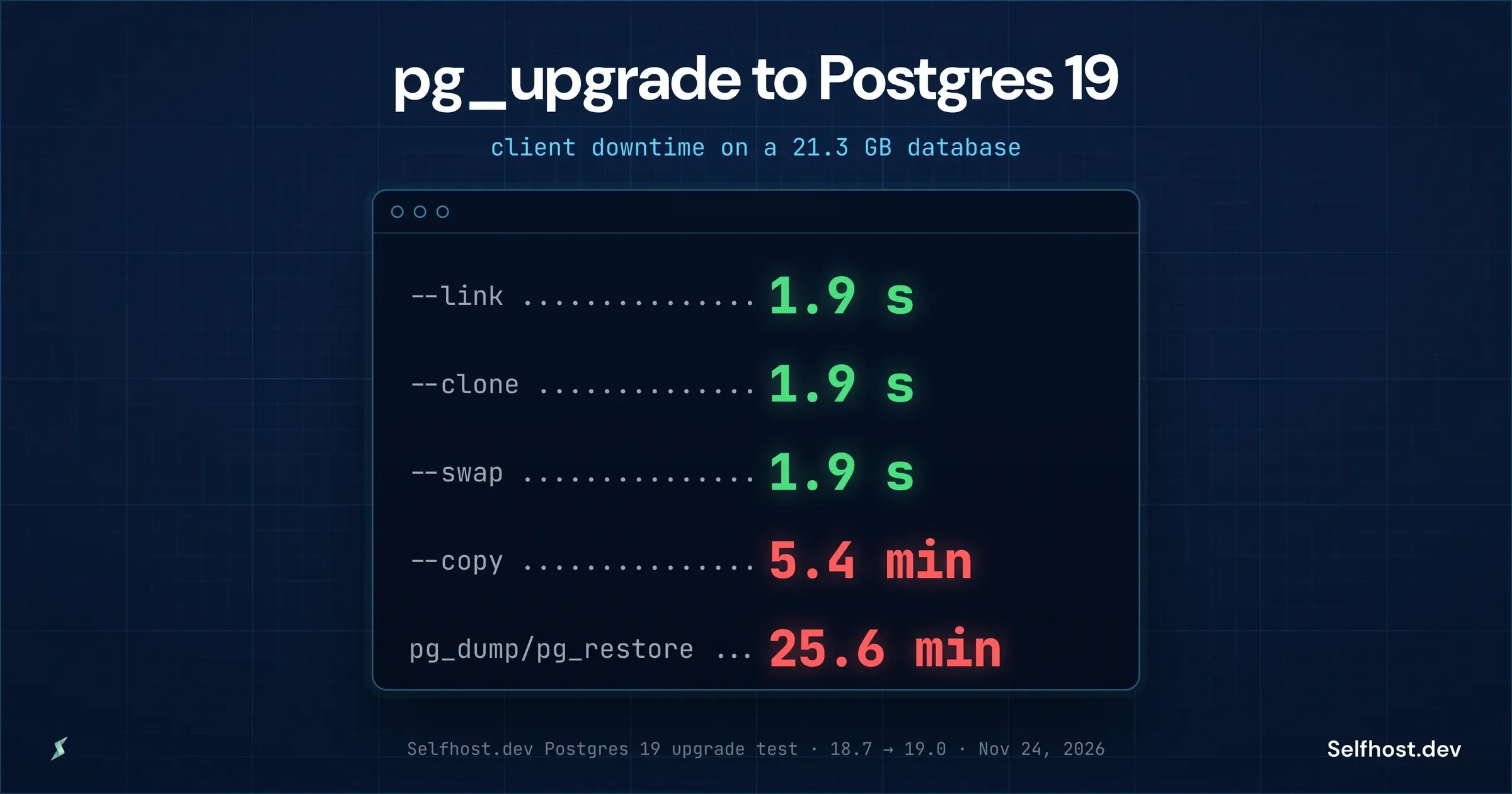
Most pg_upgrade guides tell you to plan for minutes of downtime. In the Selfhost.dev Postgres 19 upgrade test, pg_upgrade --link moved a 21.3 GB database from PostgreSQL 18.7 to 19.0 with 1.9 seconds of client downtime. --copy took 5.4 minutes, and pg_dump/pg_restore took 25.6 minutes. If you plan to upgrade Postgres to 19, the copy is not the risk. The risk is the changed defaults and removed settings that pg_upgrade --check does not see.
This guide shows how to upgrade Postgres to 19 with each method, timed on the same server. We broke the upgrade on purpose ten times and kept every exact error. Every command and output comes from runs on November 24, 2026, and the scripts and raw logs are public in selfhost-dev/pg19-upgrade-tests.
Table of Contents
KEY FACTS
- Downtime: in Selfhost.dev’s test (PostgreSQL 18.7 to 19.0, 21.3 GB),
pg_upgrade --link,--cloneand--swapeach took about 1.9 seconds of client downtime.--copytook 5.4 minutes andpg_dump/pg_restoretook 25.6 minutes.- Near-zero downtime option: a logical replication cutover from 18 to 19 cut clients off for 0.32 seconds. Before it, the initial copy took 13 minutes and the catch-up 90 seconds, while clients stayed connected.
- What
--checkmisses: of five deliberate breakages on the pg_upgrade path,pg_upgrade --checkcaught three. The two it missed, anio_workersline in postgresql.conf and aradiusline in pg_hba.conf, both stopped PostgreSQL 19 from starting.- WAL and backups: pg_upgrade does not replay or copy the old cluster’s WAL. A base backup taken on 18 cannot restore past the upgrade, so take a new base backup on 19 right away.
- Extensions: pgvector 0.8.7, PostGIS 3.7.0, pg_cron and pg_stat_statements upgraded from 18 to 19 cleanly. TimescaleDB has no PostgreSQL 19 build yet.
- If you would rather start on a fresh 19 server than upgrade in place, Selfhost.dev managed PostgreSQL runs versions 16 to 19 on AWS from $10.55 a month in us-east-1.
pg_upgrade downtime on Postgres 19: how long each method takes
pg_upgrade downtime on Postgres 19 was about 1.9 seconds with --link, --clone or --swap in Selfhost.dev’s test. That held on both a 1.67 GB and a 21.3 GB database, because those modes copy no data blocks. --copy grows with the data: 26 seconds for 1.67 GB and 5.4 minutes for 21.3 GB. A logical replication cutover took 0.32 seconds.
The Selfhost.dev Postgres 19 upgrade test: client downtime by method, PostgreSQL 18.7 to 19.0 (Nov 24, 2026). Measured on one 4 vCPU server with gp3 storage and XFS; your times depend mostly on object count and storage speed.
| Method | 1.67 GB downtime | 21.3 GB downtime | Extra disk at 21.3 GB | Rollback after start |
|---|---|---|---|---|
pg_upgrade --link | 1.9 s | 1.8 to 1.9 s | under 20 MB | Backup or standby only |
pg_upgrade --swap | 1.9 s | 1.9 to 2.0 s | under 20 MB | Backup or standby only |
pg_upgrade --clone (XFS reflink) | 1.9 s | 1.9 s | under 20 MB | 18 directory unchanged |
pg_upgrade --copy | 26 s | 320 to 326 s | 21.4 GB | 18 directory unchanged |
pg_dump/pg_restore -j 4 | 34 to 35 s | 25.6 min | 43.9 GB | 18 still running |
| Logical replication cutover | 0.28 s | 0.32 s cutover (after a 13 min copy and 90 s catch-up) | 40.5 GB | 18 still running |
Can’t run pg_upgrade on your host, or moving to a new server anyway? Open a PostgreSQL 19 instance sized for this 21 GB database in the Selfhost.dev calculator. A t4g.large with 50 GB of gp3 in us-east-1 comes to $73.79 a month, priced without signing up.
How we measured downtime. Downtime here is what a client sees. A probe ran SELECT 1 every 100 ms, and we measured the gap from its last success on 18 to its first success on 19. The --check run against the live 18 server took 0.6 s and is not downtime.
How we tested. One AWS EC2 m7i.xlarge (4 vCPU, 16 GB RAM) in ap-south-1, with a 200 GB gp3 disk (3,000 IOPS, 125 MB/s) formatted XFS with reflink. PGDG packages 18.7 and 19.0 in one Docker image, every version pinned. Two pgbench datasets with foreign keys, an extra index, an extended statistics object and an identity column: scale 100 (1.67 GB) and scale 1300 (21.3 GB). Every run started with a cold page cache.
Most guides estimate pg_upgrade downtime in minutes, and that holds only for --copy. The link modes finished in under 2 seconds on both sizes, so database size stopped mattering. What mattered was the number of objects and how fast the servers stopped and started.
Postgres 19 features that matter for your upgrade
PostgreSQL 19.0 was released on November 19, 2026, and is supported until November 19, 2031. Five features announced for 19 were pulled before release, and some pages still list them as shipped. Selfhost.dev’s test ran each pulled feature on 19.0, and every one failed with a syntax error or “function does not exist”.
That five-year window matters on managed services too. Once a version passes community end of life, AWS RDS bills Extended Support per vCPU-hour, and our RDS cost breakdown lists the dates for each major version.
The table keeps only the Postgres 19 new features that change how you operate a server. The full list is in the PostgreSQL 19 release notes.
| Feature | In 19.0? | What we saw on 19.0 |
|---|---|---|
REPACK and REPACK (CONCURRENTLY) | Shipped | repack (concurrently) rp ran without error |
| Parallel autovacuum | Shipped | New setting autovacuum_max_parallel_workers (default 0) and five autovacuum_*_score_weight settings |
| Auto-scaling I/O workers | Shipped | io_workers is gone; io_min_workers, io_max_workers, io_worker_idle_timeout, io_worker_launch_interval are new |
Logical replication without a restart when wal_level = replica | Shipped | New read-only setting effective_wal_level |
| Aggregation before joins | Shipped | New settings enable_eager_aggregate, min_eager_agg_group_size |
| Faster foreign-key checks | Shipped | A 5M-row insert with an FK took 10.0 s on 19 and 19.7 s on 18 (see the benchmark) |
WAIT FOR LSN, logical replication of sequences | Shipped (release notes) | Not run on 19 here. An 18 publisher cannot publish sequences (see the logical replication section) |
SQL/PGQ (CREATE PROPERTY GRAPH, GRAPH_TABLE) | Pulled | ERROR: syntax error at or near "property" |
ALTER TABLE ... MERGE PARTITIONS / SPLIT PARTITION | Pulled | ERROR: syntax error at or near "merge" |
UPDATE ... FOR PORTION OF | Pulled | ERROR: syntax error at or near "for" |
| Online checksum toggle | Pulled | ERROR: function pg_enable_data_checksums() does not exist |
pg_get_*_ddl() functions | Pulled | No function matches ^pg_get_.*_ddl$ in pg_proc |
This is what a pulled feature looks like on 19.0:
postgres=# alter table m merge partitions (m1, m2) into m12;
ERROR:  syntax error at or near "merge"
LINE 1: alter table m merge partitions (m1, m2) into m12
                      ^
To find every setting change, we compared pg_settings.boot_val on a new 18.7 cluster and a new 19.0 cluster. 19.0 adds 22 settings and removes two: io_workers and escape_string_warning. Four defaults change, and the next section covers them.
Postgres 19 defaults that pg_upgrade --check won’t report
Four built-in defaults change between PostgreSQL 18.7 and 19.0: TOAST compression, JIT, lock-wait logging and max_locks_per_transaction. pg_upgrade --check reports none of them. Two can change your capacity or your logs on the first day, and MD5 logins now print a warning to every client.
setting                     18.7    19.0
default_toast_compression   pglz    lz4
jit                         on      off
log_lock_waits              off     on
max_locks_per_transaction   64      128
max_locks_per_transaction must be doubled if you set it yourself. 19 sizes the lock table differently, so the same number now holds fewer locks. With max_locks_per_transaction = 64 and max_connections = 100 on both versions, we counted how many tables one transaction could lock:
| Version | max_locks value | Tables locked in one transaction |
|---|---|---|
| 18.7 | 64 | about 14,960 |
| 19.0 | 64 | about 8,750 |
| 19.0 | 128 | about 17,519 |
Past the limit, both versions fail the same way:
ERROR:  out of shared memory
HINT:  You might need to increase "max_locks_per_transaction".
If you copy a tuned postgresql.conf from 18, a transaction that touches many partitions can fail on 19 with the same setting. If you never set it, the new default of 128 already covers this.
JIT is off by default. On one CPU-bound aggregate over 10 million cached rows, JIT made the query slower on 19. It took 329 ms with jit = off and 347 ms with jit = on (median of runs 2 to 5). The first JIT run took 875 ms. JIT compiled 36 functions in 26 ms per run, and the query did not gain that time back. Test your own analytic queries before you turn JIT on again. Also check select pg_jit_available(); first: on PGDG packages, JIT is in a separate postgresql-19-jit package (see field notes).
log_lock_waits is on. Any session that waits longer than deadlock_timeout (1 s by default) for a lock now writes a log line. On a busy server this can add log volume. The release notes list it under Monitoring, not in the migration section, so it is easy to miss.
New TOAST data uses lz4, old data stays pglz. Values that are already stored keep their compression. We wrote 2,000 rows with pglz on 19, then ran REPACK and VACUUM FULL. Both kept pglz. Only an UPDATE that rewrote the value changed it to lz4:
 rows written with pglz          pglz|2000
 after REPACK                    pglz|2000
 after VACUUM FULL               pglz|2000
 after UPDATE body = body || ''  lz4|2000
MD5 logins now warn. MD5 still works on 19, but each login prints a warning to the client:
WARNING:  authenticated with an MD5-encrypted password
DETAIL:  MD5 password support is deprecated and will be removed in a future release of PostgreSQL.
You can silence it with md5_password_warnings = off. Better, move each role to SCRAM: set password_encryption = 'scram-sha-256', set the password again, and change md5 to scram-sha-256 in pg_hba.conf. That worked on 19 with no warning. If PgBouncer sits in front of Postgres, it needs SCRAM too. Our PgBouncer pool size guide was tested with scram-sha-256 end to end. 19 also adds password_expiration_warning_threshold (7 days by default).
What breaks: what pg_upgrade --check catches and what it misses
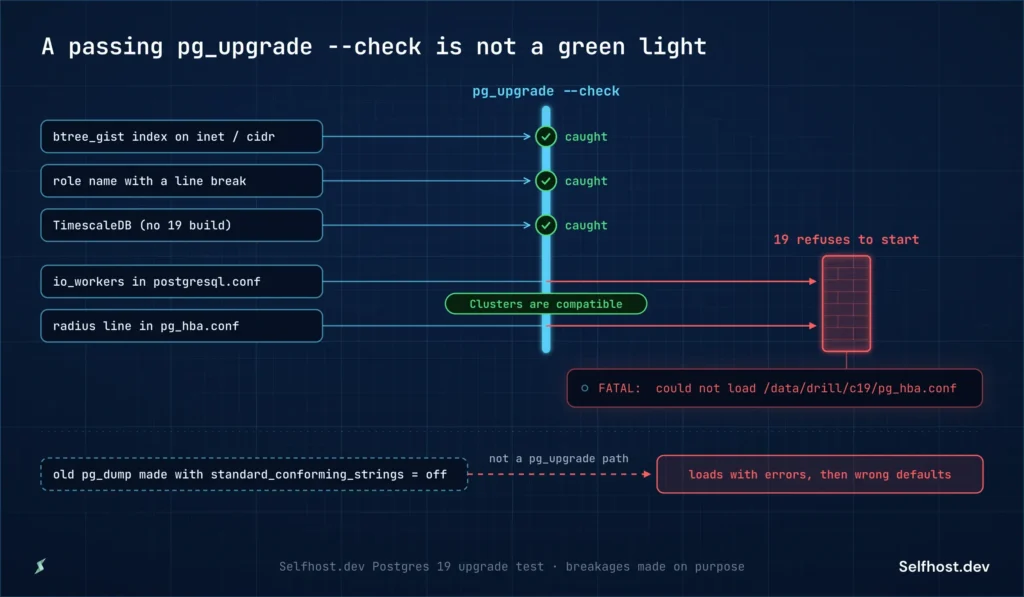
Five of the six breakages in Selfhost.dev’s test went through pg_upgrade, and pg_upgrade --check stopped three of them before it touched any data. The other two passed the check, then stopped 19 from starting. The sixth, an old dump file, never meets --check at all. Run the check, and also read your config files and your dump scripts.
The Selfhost.dev Postgres 19 upgrade test: five pg_upgrade breakages and one dump problem
| Breakage | Caught by the check? | Where it fails |
|---|---|---|
io_workers in postgresql.conf | No | 19 refuses to start |
radius line in pg_hba.conf | No | 19 refuses to start |
18 dump made with standard_conforming_strings = off | No (not a pg_upgrade path) | Load into 19: errors, then wrong data |
btree_gist index on inet/cidr | Yes | The check, before any data moves |
| Database or role name with a line break | Yes | The check |
| Extension with no 19 build (TimescaleDB) | Yes | The check |
1. io_workers in postgresql.conf
The setting is removed. If you copy your old config, 19 does not start:
LOG:  unrecognized configuration parameter "io_workers" in file "/data/drill/c19/postgresql.conf" line 951
FATAL:  configuration file "/data/drill/c19/postgresql.conf" contains errors
Fix: delete the line. If you tuned it, set io_min_workers (default 2) and io_max_workers (default 8) instead.
2. RADIUS in pg_hba.conf
18 accepted the line. pg_upgrade --check said *Clusters are compatible*. Then 19 refused to start with the same pg_hba.conf:
LOG:  invalid authentication method "radius"
CONTEXT:  line 1 of configuration file "/data/drill/c19/pg_hba.conf"
FATAL:  could not load /data/drill/c19/pg_hba.conf
Fix: move those users to another authentication method before the upgrade.
3. An old dump with standard_conforming_strings = off
This was the worst one, because part of it is silent. It is also the one breakage that does not go through pg_upgrade. We set standard_conforming_strings = off on 18, made a table whose column default holds a Windows path, and dumped it with the 18 pg_dump. Loaded into 19 with psql, two lines fail:
psql:old18.sql:15: ERROR:  non-standard string literals are not supported
psql:old18.sql:20: ERROR:  unrecognized configuration parameter "escape_string_warning"
psql does not stop on errors by default, so the load goes on. The rows that come through COPY are correct. The DDL strings are not: the dump wrote 'C:\\temp\\new' for the old non-standard parser, and 19 reads both backslashes. A new row now gets a different default:
18: default value of a new row: C:\temp\new
19: default value of a new row: C:\\temp\\new
Table comments change the same way. Fix: dump the 18 server with the 19 pg_dump. It writes SET standard_conforming_strings = on; and single backslashes, and the same data loads into 19 correctly. Also load dumps with -v ON_ERROR_STOP=1.
4. btree_gist indexes on inet or cidr
This is the blocker most likely to hit a real database. 19 removes the btree_gist operator classes gist_inet_ops and gist_cidr_ops, and the check refuses to continue:
Checking for uses of gist_inet_ops/gist_cidr_ops              fatal

Your installation contains indexes that use the btree_gist extension's
gist_inet_ops or gist_cidr_ops operator classes, which cannot be
binary-upgraded.  Replace them with indexes that use the built-in GiST
inet_ops operator class.
The file it names lists each index (public.hosts_ip_gist, public.hosts_net_gist). Fix: drop them on 18, upgrade, then create them again on 19. A plain CREATE INDEX ... USING gist (ip) picks the built-in inet_ops. To find them before you start, run this on 18:
SELECT n.nspname, c.relname AS table_name, i.relname AS index_name, opc.opcname
FROM pg_index x
JOIN pg_class i ON i.oid = x.indexrelid
JOIN pg_class c ON c.oid = x.indrelid
JOIN pg_namespace n ON n.oid = c.relnamespace
JOIN unnest(x.indclass::oid[]) AS k(opcoid) ON true
JOIN pg_opclass opc ON opc.oid = k.opcoid
WHERE opc.opcname IN ('gist_inet_ops', 'gist_cidr_ops');
5. A database or role name with a line break
Checking names of databases, roles, and tablespaces           fatal

Your installation contains databases, roles, or tablespaces with names
with invalid characters (newline or carriage return).  To fix this,
rename these objects.
The file it names listed database name = "sales\neu" and role name = "report\ner" (the line break shown as \n). Fix: rename them on 18 with ALTER DATABASE ... RENAME TO and ALTER ROLE ... RENAME TO.
6. An extension with no build for 19
We installed TimescaleDB 2.32.0 on 18. PGDG has no TimescaleDB package for 19, so the check stops:
Checking for presence of required libraries                   fatal

Your installation references loadable libraries that are missing from the
new installation.
The file it names says could not load library "timescaledb-2.32.0": ERROR: could not access file "timescaledb-2.32.0": No such file or directory. There is no fix on your side: wait for a TimescaleDB release that supports 19.
How to upgrade Postgres to 19: three methods, timed
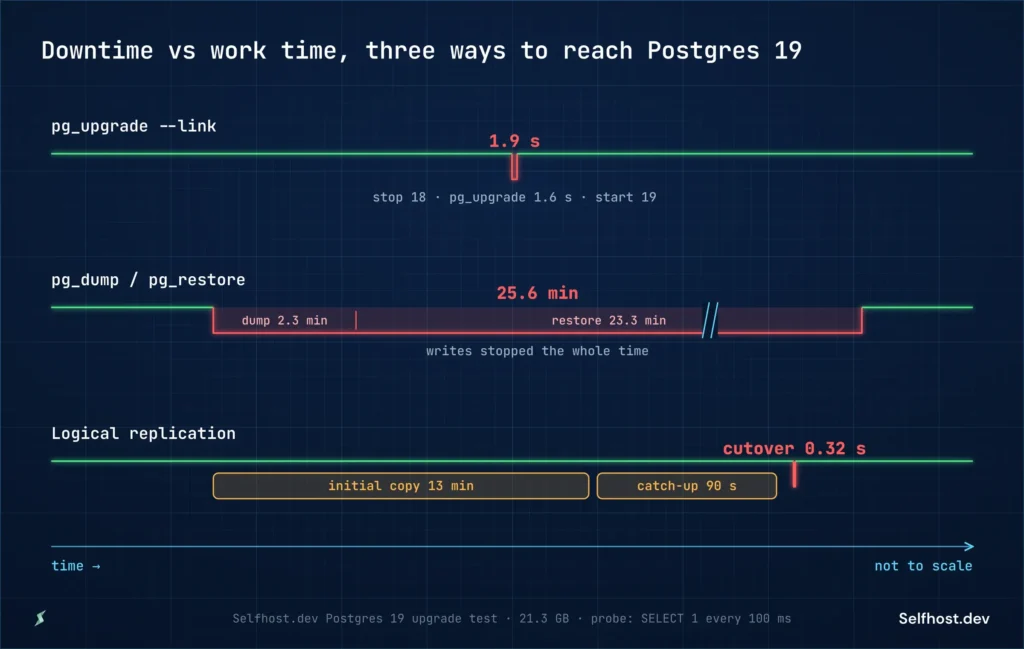
There are three PostgreSQL major version upgrade methods: pg_upgrade in place, pg_dump/pg_restore into a new cluster, and logical replication with a cutover. On the same 21.3 GB database, they took 1.9 seconds, 25.6 minutes and 0.32 seconds of client downtime. How to upgrade Postgres well depends on your downtime budget and your rollback plan.
pg_upgrade –link vs –copy, –clone and –swap
--link, --clone and --swap each took about 1.9 seconds of downtime here, whatever the database size. --copy took 5.4 minutes on 21.3 GB because it rewrites every data file. The difference between them is disk space and rollback.
pg_upgrade needs the 18 and the 19 binaries on the same host. We built one Docker image with both versions from the PGDG packages, every version pinned. tianon/postgres-upgrade also has an 18-to-19 tag since November 24, 2026; we did not use it. The data directories are on a mounted volume. Inside that container, the sequence is:
B18=/usr/lib/postgresql/18/bin
B19=/usr/lib/postgresql/19/bin

# 1. New, empty 19 cluster. Same locale, encoding and checksum setting as 18.
$B19/initdb -D /data/c19 -U postgres -E UTF8 --locale=en_US.UTF-8

# 2. Check while 18 is still running. This is not downtime.
$B19/pg_upgrade --check -b $B18 -B $B19 -d /data/c18 -D /data/c19

# 3. Downtime starts: stop 18 cleanly, upgrade, start 19.
$B18/pg_ctl -D /data/c18 -m fast stop
$B19/pg_upgrade --link -j 4 -b $B18 -B $B19 -d /data/c18 -D /data/c19
$B19/pg_ctl -D /data/c19 -l /data/c19/server.log start

# 4. Clients are back. Fill in the statistics that did not carry over.
$B19/vacuumdb --all --analyze-in-stages --missing-stats-only
The check ran against the live 18 server in 0.6 s. Of the 1.9 s of downtime with --link, pg_upgrade took 1.6 s; stopping 18 and starting 19 took 0.1 s each. The data size did not matter, because --link, --clone (on XFS with reflink) and --swap copy no data blocks. --copy rewrites every file: 26 s on 1.67 GB and 320 to 326 s on 21.3 GB (about 66 MB/s on our gp3 disk), plus 21.4 GB of extra disk.
Statistics carried over: before any ANALYZE, 19 already had the column statistics and our extended statistics object. The --missing-stats-only pass took 0.07 s. pg_upgrade still suggests a full vacuumdb --all --analyze-only afterwards; clients do not need to wait for it.
The cost of --link and --swap is the rollback. Once 19 has started, the 18 directory is not safe to start: pg_upgrade renames global/pg_control to pg_control.old and says so. Your rollback is a backup or a standby. The pg_upgrade docs say --copy and --clone leave the old cluster usable; we did not start 18 again to test it.
pg_upgrade vs pg_dump and pg_restore
pg_dump/pg_restore took 25.6 minutes on 21.3 GB, against 1.9 seconds for pg_upgrade --link, and writes must stop for the whole time. It is still the method you need when you cannot run pg_upgrade on the host. Use the 19 client tools, also for the dump from the 18 server (see breakage 3):
$B19/pg_dumpall -p 5432 --globals-only > globals.sql
$B19/pg_dump    -p 5432 -Fd -j 4 -f /data/dump postgres
$B19/psql       -p 5433 -f globals.sql postgres
$B19/pg_restore -p 5433 -j 4 -d postgres /data/dump
On 21.3 GB the dump took 2.3 minutes and the restore 23.3 minutes. The restored database had no statistics: run ANALYZE before you send traffic to it. This is the method to use when you move into a new managed instance, where you cannot run pg_upgrade.
This is also how you move onto Selfhost.dev, where every major version starts as a new instance. Create a managed PostgreSQL 19 instance with point-in-time recovery and PgBouncer pooling included, restore into it with the 19 tools, and switch your connection string once it checks out. The restore in this test took 23.3 minutes for 21.3 GB, and the 18 server stays intact as your way back.
Postgres zero downtime upgrade? Logical replication got to 0.32 seconds
Logical replication gets a Postgres upgrade close to zero downtime: on 21.3 GB, clients were cut off for 0.32 seconds. That cutover is the last of three stages. The initial copy took 13 minutes and the catch-up 90 seconds, both while 18 kept serving traffic. Sequences, DDL and large objects do not replicate from an 18 publisher.
We kept 18 under load during the whole run, about 500 pgbench TPC-B transactions and 100 inserts per second. Then:
-- on 19: the schema first (19 pg_dump --schema-only | psql)
-- on 18:
CREATE PUBLICATION p FOR ALL TABLES;
-- on 19:
CREATE SUBSCRIPTION s
  CONNECTION 'host=... port=5432 dbname=postgres user=postgres'
  PUBLICATION p WITH (copy_data = true);
The initial copy of 21.3 GB took 13 minutes. After it, the subscriber was still behind, and it needed 90 s more to get within 16 MB of 18. Only then did we cut over: stop the writers, wait until the slot’s confirmed_flush_lsn reached 18’s current LSN, copy the sequence values, disable the subscription, and write to 19. That logical replication upgrade downtime was 0.32 s on 21.3 GB and 0.28 s on 1.67 GB. The row counts and sum(abalance) matched on both sides. The window does not include the time your application takes to switch its connection string.
Sequences do not come over from 18. Publishing them is a 19 feature, and 18 refuses it:
postgres=# create publication pseq for all sequences;
ERROR:  syntax error at or near "sequences"
If you forget them, the first insert on 19 fails:
ERROR:  duplicate key value violates unique constraint "orders_pkey"
DETAIL:  Key (id)=(1) already exists.
Copy them by hand at cutover, after the writers stop. Generate one setval per sequence on 18 and run the output on 19:
SELECT format('SELECT setval(%L, %s, %s);',
              schemaname || '.' || sequencename,
              coalesce(last_value, 1),
              CASE WHEN last_value IS NULL THEN 'false' ELSE 'true' END)
FROM pg_sequences;
DDL and large objects do not replicate either. Freeze schema changes until the cutover.
Which method to pick
The fastest pg_upgrade method in this test was any mode that copies no data: --link, --clone or --swap, all about 2 seconds. Which one to pick depends on your filesystem and your rollback plan. M. Aziz, who ran the tests, puts it this way:
“If the database is on a filesystem with reflink (XFS, Btrfs), use
--clone: about 2 s of downtime, and the 18 directory stays usable. Without reflink and with a standby or a fresh backup, use--link. Use--copyonly when you cannot accept a one-way step and you have the disk and the minutes. Use logical replication when even 2 s is too much, or when you cannot runpg_upgradeon the host, as on a managed service. Usepg_dump/pg_restorefor small databases, or when you also want to change the encoding or the server.”
Mohammad Aziz, backend engineer at Selfhost.dev
One caveat on rollback: that the 18 directory stays usable after --clone comes from the pg_upgrade docs. This test did not start 18 again, so rehearse your own rollback before you count on it.
Does pg_upgrade replay WAL?
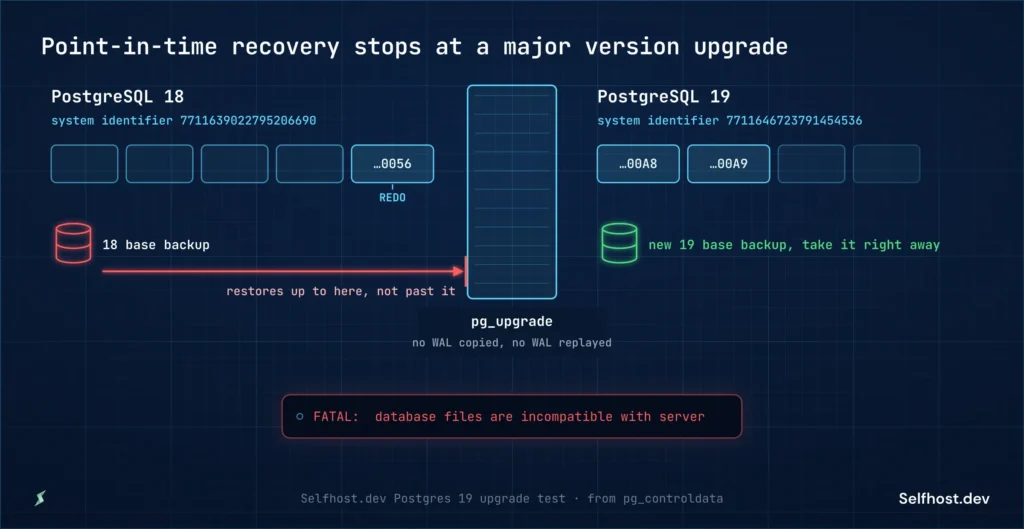
No. pg_upgrade does not replay the old cluster’s WAL and does not copy it. It needs a cleanly shut-down 18 cluster, so there is nothing to replay. In Selfhost.dev’s test, the 19 cluster started its WAL at a later segment number than 18’s last one. It also got a new system identifier, so no WAL file is shared across the upgrade.
What pg_upgrade does with WAL files
pg_upgrade does not preserve the old WAL files and does not reset the new cluster to the old WAL position. We compared pg_controldata before and after:
18 after clean shutdown
  Database system identifier:        7711639022795206690
  Database cluster state:            shut down
  Latest checkpoint's REDO WAL file: 000000010000000000000056
  (pg_wal holds recycled segments up to ...00A5)

19 after pg_upgrade --link
  Database system identifier:        7711646723791454536
  Latest checkpoint's REDO WAL file: 0000000100000000000000A9
  pg_wal: ...00A8, ...00A9 (no file shared with 18)
The new system identifier is why WAL from 18 is not compatible with 19, and why a base backup from 18 cannot get you past the upgrade.
PITR across a major version upgrade
Point-in-time recovery does not cross a PostgreSQL major version upgrade. We took a base backup of 18 with archiving on, wrote a row on 18, upgraded, and wrote a row on 19. Then we tried two restores. 19 refuses the 18 backup:
FATAL:  database files are incompatible with server
DETAIL:  The data directory was initialized by PostgreSQL version 18, which is not compatible with this version 19.0.
18 restores the backup and replays the 18 WAL to its end, then stops and opens on a new timeline. It has the row written on 18 and not the row written on 19. So take a new base backup of 19 right after the upgrade. Until it finishes, your only path back is the 18 backup plus the 18 WAL, which ends at the upgrade.
WAL archive and standbys after the upgrade
Give the 19 cluster its own WAL archive location and its own standbys. In our test, a shared archive directory made the 19 archiver collide with a file name that 18 had already archived.
Use a new archive location for 19. We kept one archive directory for both versions, with the usual test ! -f ... && cp command. The 19 archiver then tried to archive its own 000000010000000000000001, a name the 18 cluster had already archived:
 archived_count | last_archived_wal        | failed_count | last_failed_wal
              2 | 00000001000000000000000A |            6 | 000000010000000000000001
With a command that does not test for the file, it would have replaced the 18 file. Point 19 at a new path, or a new bucket prefix, before you start it.
Standbys. A standby of 18 cannot follow 19: the system identifier is different. Build new standbys from the 19 primary.
Which extensions support Postgres 19?
Four of the five extensions in Selfhost.dev’s test work on PostgreSQL 19 in release week: pgvector, PostGIS, pg_cron and pg_stat_statements. TimescaleDB does not. We installed each one from PGDG on 19.0, ran a small test, then upgraded an 18 cluster that used the four that exist for 19.
| Extension | Version on 19.0 (PGDG) | Installs on 19 | 18 to 19 with pg_upgrade | Selfhost.dev catalog for 19 |
|---|---|---|---|---|
| pgvector | 0.8.7 | Yes (HNSW index and a nearest-neighbour query ran) | Passed; the index answered the same query | Available |
| PostGIS | 3.7.0 | Yes | Passed; the geometry row came over | Available |
| pg_cron | 1.6 | Yes (a job was scheduled) | Passed; the job came over | Available |
| pg_stat_statements | 1.13 | Yes | Passed; stays at 1.12 until you run the update script | Available |
| TimescaleDB | none for 19 | No: extension "timescaledb" is not available | Blocked by --check (breakage 6) | Runs on 16, 17 and 18 |
The Selfhost.dev column comes from the live extension catalog for PostgreSQL 19 on November 24, 2026. For vector search on it, see pgvector on managed Postgres.
After the upgrade, pg_upgrade wrote an update_extensions.sql:
\connect postgres
ALTER EXTENSION "pg_stat_statements" UPDATE;
Run it with psql as a superuser on 19. The order of work is: update each extension to its newest version on 18, check that the same version exists for 19, upgrade, then run the update script.
Postgres 18 vs 19: a quick benchmark
Only one of our four tests got faster on PostgreSQL 19. A bulk insert into a table with a foreign key took half the time. pgbench, a manual parallel VACUUM and autovacuum gave the same times on 18.7 and 19.0. Both ran on the same host with the same settings (shared_buffers = 4GB, max_wal_size = 16GB) and the same data.
| Test | 18.7 | 19.0 | Change |
|---|---|---|---|
INSERT ... SELECT of 5M rows into a child table with an FK to a 1M-row parent | 19.7 s | 10.0 s | 2.0 times faster |
| The same insert without the FK | 2.6 s | 2.5 s | none |
| pgbench TPC-B, scale 100, 16 clients, 4 threads, 120 s | 6,524 tps | 6,536 tps | none |
VACUUM (PARALLEL 3) on a bloated 20M-row table with 3 indexes | 23.3 to 24.5 s | 23.5 to 24.5 s | none |
Autovacuum of that table (19: autovacuum_max_parallel_workers = 3) | 119.6 s | 118.9 s | none |
The FK and pgbench rows are the average of runs 2 and 3; the first run of each was a cold start. In the FK test, the cost of the FK check itself went from 17.2 s to 7.4 s. For pgbench, the 19 data came from the 18 data through pg_upgrade, and we ran ANALYZE on it. The FK and vacuum tests ran on new, empty clusters of each version.
Parallel autovacuum worked, but it did not save time here. The 19 log line says parallel workers: index vacuum: 2 planned, 2 launched in total. CPU time went from 6.6 s to 4.2 s, but the elapsed time stayed at about 119 s. Autovacuum’s cost-based delay was at its default, and it limits the leader and the workers together, so the table was paced, not CPU-bound. We did not test with the delay off. The new setting is 0 by default, so parallel autovacuum is off until you set it.
These runs compare two versions on one server. For absolute throughput and latency on managed instances, see the Selfhost.dev PostgreSQL benchmarks, measured with pgbench on PostgreSQL 18.
Field notes: what went wrong the first time
Six mistakes from the first runs of this test changed the results or hid an error, and each one has a lesson for your own Postgres 19 upgrade. These are Mohammad Aziz’s notes from the test log, in his words.
- “My first logical cutover took 21.7 s, not 0.3 s. I cut over 30 s after the 13-minute copy ended, while the subscriber was still applying the backlog. After I waited for the lag to drop below 16 MB (90 s more), it took 0.32 s. Watch the lag, not the clock.”
- “My sequence copy wrote
setval(..., t).format('%s', boolean)printst, so everysetvalfailed, andpsqlwithoutON_ERROR_STOPhid it. The first insert on 19 then hit a duplicate key.” - “My image had no JIT. JIT is in
postgresql-19-jit, which--no-install-recommendsskipped, so my first JIT test compared nothing. Runselect pg_jit_available();first.” - “My first JIT query measured the disk. It read 21 GB at about 125 MB/s, so both runs took 110 s. I moved it to a dataset that fits in memory.”
- “
kill -INTdid not stop pgbench. A non-interactive shell starts background jobs with SIGINT ignored. Usekill -TERM.” - “I expected
REPACKto recompress old pglz data as lz4. It did not, and neither didVACUUM FULL.”
Postgres 19 upgrade checklist
Ten steps for a PostgreSQL upgrade to 19, each from a section above. Items 4 and 5 are the ones pg_upgrade --check will not flag. Item 2 it flags only once you are already planning the window.
- Check that every extension you use has a build for 19, and update each one on 18 first.
- Run the
btree_gistquery on 18; drop thegist_inet_ops/gist_cidr_opsindexes and plan to create them again on 19. - Run
pg_upgrade --checkwith the 19 binaries against a copy of production, and fix everyfatalline. - Remove
io_workersfrompostgresql.confand anyradiusline frompg_hba.conf, because--checkdoes not see them and 19 will not start. - Double any
max_locks_per_transactionyou set yourself, or remove it to get the new default of 128. - Move md5 roles to
scram-sha-256before the upgrade. - Take every logical dump with the 19
pg_dump, and load dumps withON_ERROR_STOP=1. - Point the 19 cluster at a new WAL archive location before it starts.
- Right after the upgrade, run
vacuumdb --all --analyze-in-stages --missing-stats-only, thenupdate_extensions.sql, then a new base backup. - Build new standbys from the 19 primary, and test your analytic queries with JIT off (the new default) and on.
Should you upgrade to Postgres 19 now?
Yes, if your extensions are ready and you fix the checklist items first: in Selfhost.dev’s test, the PostgreSQL upgrade itself took under 2 seconds of downtime with the link modes. Wait if an extension you need has no 19 build, or if your standby and backup setup cannot be rebuilt right after the upgrade.
Upgrade now if:
- every extension you use has a 19 build (pgvector, PostGIS, pg_cron and pg_stat_statements do);
- you have no
gist_inet_ops/gist_cidr_opsindexes, or you can rebuild them after the upgrade; - you can take about 2 s of downtime (
--link,--cloneor--swap) or set up logical replication; - you have a standby or a fresh backup for rollback, or you use
--clone.
Wait if:
- you use TimescaleDB: there is no build for 19 yet, so keep it on 18 for now (Selfhost.dev runs managed TimescaleDB on Postgres 16, 17 and 18);
- you run many partitions with a tuned
max_locks_per_transactionand have not tested the doubled value; - your analytic workload depends on JIT and you have not compared it on 19;
- your standby and PITR setup cannot be rebuilt right after the upgrade.
If you can upgrade now, start with pg_upgrade --check on a copy of production today. If you have to wait, run the btree_gist query and clean your config files on 18 now, so the upgrade day is short.
Upgrade in place, or move to a managed Postgres 19
Selfhost.dev runs managed PostgreSQL 16 to 19 on AWS from $10.55 a month in us-east-1, billed by the hour, with point-in-time recovery and PgBouncer connection pooling included.
This test had to rebuild four things by hand after the upgrade: a base backup, a WAL archive, the standbys and a rollback plan. On a Selfhost.dev 19 instance, point-in-time recovery archives WAL to S3 for restore to any second, with no tier fee and WAL storage at $0.03 per GB. Multi-AZ adds a standby in a second availability zone with automatic failover. PgBouncer pooling on port 6432 is included, and pgvector, PostGIS and pg_cron are in the catalog for 19. A 2 vCPU, 8 GB instance with 50 GB of storage in us-east-1 is $73.79 a month.
Some managed services upgrade a database in place. On Selfhost.dev, moving to 19 means a new instance plus pg_dump/pg_restore, which took 25.6 minutes for 21.3 GB in this test. The trade-off works in your favour on rollback: your 18 instance keeps running untouched until you cut over, so going back is a connection-string change, not a restore. For a database too large for a dump window, our RDS migration case study shows a team moving about 300 GB with logical replication and a tested restore before cutover.
Stay self-managed if you need TimescaleDB on 19 the day it ships, or if your team wants to run pg_upgrade --clone on its own storage for a 2-second window. Our AWS RDS vs self-hosted PostgreSQL cost comparison prices the engineer time that path takes, upgrades included.
Ready to try the move on a copy of your data? Start a PostgreSQL 19 instance on Selfhost.dev with the $5 welcome credit, no card needed, and restore last night’s dump into it with the commands above.
Postgres 19 upgrade FAQ
When is the Postgres 19 release date?
PostgreSQL 19 was released on November 19, 2026, and the PostgreSQL project supports it until November 19, 2031, five years after the first release. Selfhost.dev’s upgrade test used the 19.0 packages from PGDG on November 24. On Selfhost.dev managed PostgreSQL, you can pick 19 for new databases, and 18 stays the default.
Does Postgres 19 include SQL/PGQ graph queries?
No. SQL/PGQ was pulled before the PostgreSQL 19 release. On 19.0, CREATE PROPERTY GRAPH fails with syntax error at or near "property", and GRAPH_TABLE fails the same way. MERGE PARTITIONS, SPLIT PARTITION, FOR PORTION OF, online checksum changes and the pg_get_*_ddl() functions were pulled too.
Can I upgrade Postgres 16 or 17 directly to 19?
Yes. The pg_upgrade docs support upgrades “from 9.2.X and later to the current major release”. So 16 or 17 to 19 is one step, the same way pg_upgrade from 16 to 17 works. Selfhost.dev’s test covered 18 to 19 only. The 19 breakages here should also hit 16 and 17 clusters, but we did not test them; read the 17 and 18 release notes too.
How do I run pg_upgrade for Postgres 19 in Docker?
Use one container that has both the 18 and 19 binaries, with both data directories on the same mounted volume so --link works. Selfhost.dev’s test built that image from PGDG packages, with the Dockerfile in the test repo. The tianon/postgres-upgrade image also has an 18-to-19 tag since November 24, 2026, which this test did not use.
Is Postgres 19 ready for production?
The server is. In Selfhost.dev’s tests, 19.0 upgraded cleanly, kept every row and sequence value, and ran pgbench at the same speed as 18. Your extensions decide it: TimescaleDB has no 19 build yet. Fix the config items pg_upgrade --check does not catch, such as io_workers and RADIUS, before you start.
How do I upgrade a managed Postgres to 19?
On a managed service you cannot run pg_upgrade yourself, so the provider decides the method. Some upgrade in place; others, including Selfhost.dev, have you create a 19 instance and restore into it with the 19 pg_dump and pg_restore. Our guide to how managed Postgres providers compare covers the main options.
Keep reading: Selfhost.dev managed PostgreSQL, versions 16 to 19 · PgBouncer pool size, tested on 2 vCPU · Managed PostgreSQL providers compared · The test scripts and raw results on GitHub
Based on this page: ·
On now or still deciding?
What's the bill you're looking at?
Roughly how much a month, all in?
Matched to RDS, we bill 3.0x less in ap-south-1 (Mumbai) and 2.1x less in us-east-1.
2 vCPU / 4 GB with 20 GB: $24.54/mo in Mumbai, $35.27/mo in us-east-1, against an estimated $73.75/mo on RDS.
See a real RDS bill, before and after →Neon meters compute hours and sleeps. We bill one fixed hourly rate and never sleep.
{price} Same number in a quiet month and a launch month.
Price your size →Two ways off the Supabase bill and you can keep the Supabase stack.
Self-host Supabase on a managed server: a European 8 GB server is $0.03/hr or move just the database to a dedicated Postgres. {price}
How self-hosted Supabase works here →An enterprise client is moving production ClickHouse to us at up to 60% less.
Worked example: off ClickHouse Cloud Scale to always-on managed ClickHouse, $891.86 to $364.03 a month, 59%.
See the ClickHouse bill, before and after →A PaaS bills per service. A project server is one bill for everything on it.
Worked example: a studio consolidated client hosting onto project servers, $390.00 to $82.66 a month, 78%.
See that bill, before and after →Managed PostgreSQL from $8.10 a month in Mumbai. Dedicated Postgres or MySQL on AWS, with restore, pooling and Multi-AZ failover when you want it.
{price} Postgres and MySQL price the same.
Price your size →Managed PostgreSQL from $8.10 a month in Mumbai. Dedicated Postgres or MySQL on AWS, with restore, pooling and Multi-AZ failover when you want it.
{price}
Price your size →Managed PostgreSQL from $8.10 a month in Mumbai. Dedicated Postgres or MySQL on AWS, with restore, pooling and Multi-AZ failover when you want it.
{price} Pay-as-you-go credits, top up from $5, no plan tiers.
Price your size →Most setups map onto two shapes: dedicated databases on AWS and a project server for everything else.
{price} Project servers from about $0.02/hr in Europe.
Price your size →Under $200 a month, the calculator beats a human reply. Price it there first.
What's it for?
Where do your users mostly sit?
Dedicated managed Postgres or MySQL, with point-in-time restore, pooling and Multi-AZ failover when you want it.
{region} If you need scale-to-zero or instant branching, Neon fits better than we do.
What managed Postgres includes →Managed ClickHouse for events at volume or TimescaleDB on managed Postgres for time-series next to your app data.
Worked example: off ClickHouse Cloud Scale, $891.86 to $364.03 a month, 59%. {region}
See the ClickHouse bill, before and after →pgvector on managed Postgres: one database instead of a second vendor.
{region} TimescaleDB is one click away on the same instance if you also have time-series.
When a dedicated vector DB is worth it →A project server from about $0.02/hr in Europe: push to GitHub and it deploys, several apps and their databases on one box.
Auto-deploy on push, PR previews, custom domains. The $5 welcome credit covers the start of it, no card needed; it bills by the hour.
How Projects work →Project servers: many sites per server, one bill.
Worked example: a studio consolidated client hosting, $390.00 to $82.66 a month, 78%.
See that bill, before and after →Most things fit dedicated databases on AWS plus a project server for the apps.
{region}
See it in the live demo →What are you trying to do?
Which editor?
We migrate you, free, on every plan size.
An engineer runs it with you: match the instance, replicate or dump and restore, test the restore, cut over.
See one migration, step by step →The Supabase stack, one click, on a server of your own.
One click from the template. A European 8 GB server is $0.03/hr. Nothing to build or wire up.
Self-hosted Supabase in one click →Paste one config and your editor can run the whole backend.
Run it once, sign in when the browser opens and all 269 tools register.
An hourly instance you stop when you are done.
Restore a snapshot into a second instance, point staging at it and stop it when idle: only its storage bills while it is stopped.
Price a small instance →Push to GitHub and it's live: auto-deploy, PR previews, custom domains.
A project server from about $0.02/hr in Europe runs several apps and their databases.
Deploy guides by framework →The one that matters most:
Managed PostgreSQL from $8.10 a month in Mumbai. Project servers from about $0.02 an hour in Europe.
The smallest dedicated Postgres, a 1 GB t4g.micro with 1 GB of storage, is $8.10 a month in ap-south-1 (Mumbai) and $10.55 in us-east-1; the $5 welcome credit goes toward it. Pay-as-you-go credits, top up from $5, no tiers.
Price your size →When production needs help, you talk to the engineers who run it and a founder reads every request.
Outages, restores, performance issues and migrations reach the people operating the platform. No response-time promise or uptime percentage we cannot prove.
How support and recovery work →Failover, point-in-time restore and backups cover the common ways a database fails.
Multi-AZ failover is a toggle on Postgres, MySQL, Redis and ClickHouse and a cluster you pick at create on OpenSearch; Postgres and MySQL add point-in-time restore and every engine gets automated backups, live metrics and alerts.
The reliability and recovery details →We migrate you, free. An engineer plans and runs the move with you.
Match the instance, replicate or dump and restore, test the restore, cut over. Any plan size, no extra cost.
See one migration, step by step →Run it in your own AWS account with BYOC, in the region you need.
Encryption at rest on every managed instance; client TLS is a switch on PostgreSQL, MySQL and ClickHouse and always on for OpenSearch. We do not hold SOC 2 or HIPAA today and we will say so before you spend an hour.
What we can and cannot certify →Fair enough. The live demo is the fastest way to see it.
Or claim $5 to start, no card needed.
Watch the live demo →Our founder
You've already sent us your setup from this browser. A founder will reply to it; no need to send it twice.
Got it. I'll reply to within two working days, from my own inbox.
Noted. One note when it changes, nothing else.
Run managed Postgres, your way.
Dedicated PostgreSQL on AWS with PITR, connection pooling, Multi-AZ, pgvector and BYOC. From $8.10/mo in Mumbai (ap-south-1), with no surprise invoices. Limited-time offer: get $5 in free credit at signup, no card needed.
Based on this page: ·
On now or still deciding?
What's the bill you're looking at?
Roughly how much a month, all in?
Matched to RDS, we bill 3.0x less in ap-south-1 (Mumbai) and 2.1x less in us-east-1.
2 vCPU / 4 GB with 20 GB: $24.54/mo in Mumbai, $35.27/mo in us-east-1, against an estimated $73.75/mo on RDS.
See a real RDS bill, before and after →Neon meters compute hours and sleeps. We bill one fixed hourly rate and never sleep.
{price} Same number in a quiet month and a launch month.
Price your size →Two ways off the Supabase bill and you can keep the Supabase stack.
Self-host Supabase on a managed server: a European 8 GB server is $0.03/hr or move just the database to a dedicated Postgres. {price}
How self-hosted Supabase works here →An enterprise client is moving production ClickHouse to us at up to 60% less.
Worked example: off ClickHouse Cloud Scale to always-on managed ClickHouse, $891.86 to $364.03 a month, 59%.
See the ClickHouse bill, before and after →A PaaS bills per service. A project server is one bill for everything on it.
Worked example: a studio consolidated client hosting onto project servers, $390.00 to $82.66 a month, 78%.
See that bill, before and after →Managed PostgreSQL from $8.10 a month in Mumbai. Dedicated Postgres or MySQL on AWS, with restore, pooling and Multi-AZ failover when you want it.
{price} Postgres and MySQL price the same.
Price your size →Managed PostgreSQL from $8.10 a month in Mumbai. Dedicated Postgres or MySQL on AWS, with restore, pooling and Multi-AZ failover when you want it.
{price}
Price your size →Managed PostgreSQL from $8.10 a month in Mumbai. Dedicated Postgres or MySQL on AWS, with restore, pooling and Multi-AZ failover when you want it.
{price} Pay-as-you-go credits, top up from $5, no plan tiers.
Price your size →Most setups map onto two shapes: dedicated databases on AWS and a project server for everything else.
{price} Project servers from about $0.02/hr in Europe.
Price your size →Under $200 a month, the calculator beats a human reply. Price it there first.
What's it for?
Where do your users mostly sit?
Dedicated managed Postgres or MySQL, with point-in-time restore, pooling and Multi-AZ failover when you want it.
{region} If you need scale-to-zero or instant branching, Neon fits better than we do.
What managed Postgres includes →Managed ClickHouse for events at volume or TimescaleDB on managed Postgres for time-series next to your app data.
Worked example: off ClickHouse Cloud Scale, $891.86 to $364.03 a month, 59%. {region}
See the ClickHouse bill, before and after →pgvector on managed Postgres: one database instead of a second vendor.
{region} TimescaleDB is one click away on the same instance if you also have time-series.
When a dedicated vector DB is worth it →A project server from about $0.02/hr in Europe: push to GitHub and it deploys, several apps and their databases on one box.
Auto-deploy on push, PR previews, custom domains. The $5 welcome credit covers the start of it, no card needed; it bills by the hour.
How Projects work →Project servers: many sites per server, one bill.
Worked example: a studio consolidated client hosting, $390.00 to $82.66 a month, 78%.
See that bill, before and after →Most things fit dedicated databases on AWS plus a project server for the apps.
{region}
See it in the live demo →What are you trying to do?
Which editor?
We migrate you, free, on every plan size.
An engineer runs it with you: match the instance, replicate or dump and restore, test the restore, cut over.
See one migration, step by step →The Supabase stack, one click, on a server of your own.
One click from the template. A European 8 GB server is $0.03/hr. Nothing to build or wire up.
Self-hosted Supabase in one click →Paste one config and your editor can run the whole backend.
Run it once, sign in when the browser opens and all 269 tools register.
An hourly instance you stop when you are done.
Restore a snapshot into a second instance, point staging at it and stop it when idle: only its storage bills while it is stopped.
Price a small instance →Push to GitHub and it's live: auto-deploy, PR previews, custom domains.
A project server from about $0.02/hr in Europe runs several apps and their databases.
Deploy guides by framework →The one that matters most:
Managed PostgreSQL from $8.10 a month in Mumbai. Project servers from about $0.02 an hour in Europe.
The smallest dedicated Postgres, a 1 GB t4g.micro with 1 GB of storage, is $8.10 a month in ap-south-1 (Mumbai) and $10.55 in us-east-1; the $5 welcome credit goes toward it. Pay-as-you-go credits, top up from $5, no tiers.
Price your size →When production needs help, you talk to the engineers who run it and a founder reads every request.
Outages, restores, performance issues and migrations reach the people operating the platform. No response-time promise or uptime percentage we cannot prove.
How support and recovery work →Failover, point-in-time restore and backups cover the common ways a database fails.
Multi-AZ failover is a toggle on Postgres, MySQL, Redis and ClickHouse and a cluster you pick at create on OpenSearch; Postgres and MySQL add point-in-time restore and every engine gets automated backups, live metrics and alerts.
The reliability and recovery details →We migrate you, free. An engineer plans and runs the move with you.
Match the instance, replicate or dump and restore, test the restore, cut over. Any plan size, no extra cost.
See one migration, step by step →Run it in your own AWS account with BYOC, in the region you need.
Encryption at rest on every managed instance; client TLS is a switch on PostgreSQL, MySQL and ClickHouse and always on for OpenSearch. We do not hold SOC 2 or HIPAA today and we will say so before you spend an hour.
What we can and cannot certify →Fair enough. The live demo is the fastest way to see it.
Or claim $5 to start, no card needed.
Watch the live demo →Our founder
You've already sent us your setup from this browser. A founder will reply to it; no need to send it twice.
Got it. I'll reply to within two working days, from my own inbox.
Noted. One note when it changes, nothing else.