

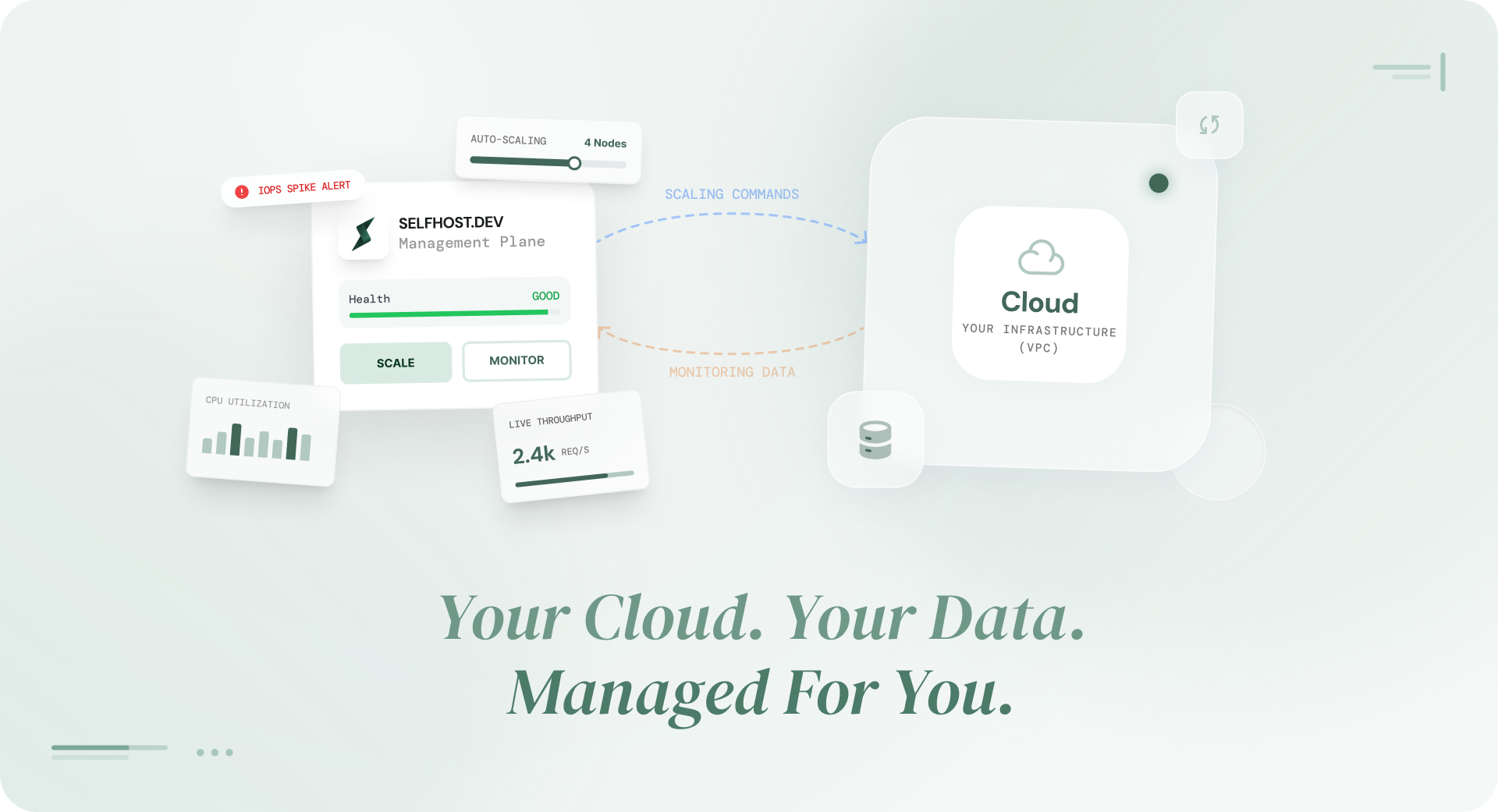
BYOC, or Bring Your Own Cloud, is a database deployment model where a third-party vendor manages your database but the database itself runs entirely inside your own cloud account. You keep full ownership of your infrastructure, your data, and your cloud bill. The vendor handles the hard parts: provisioning, backups, monitoring, failover, and patching.
Think of it this way.
With a fully managed database like AWS RDS, you hand over both your data and your infrastructure to the provider, a model that often becomes increasingly expensive as systems grow and architecture becomes more complex.
With self-hosting, you keep everything but manage it all yourself. BYOC sits in between. You keep everything. Someone else manages it for you, a shift that becomes clearer when you look at the trade-offs between managed and self-hosted databases.
This model is gaining traction among startups, SaaS companies, and engineering teams hitting the limits of traditional managed databases, with rising costs, limited configuration control, and growing concerns around data residency and vendor lock-in.
This guide breaks down how BYOC works, how it compares to managed and self-hosted databases, when it makes sense, and when it does not.
What does BYOC stand for?
BYOC stands for Bring Your Own Cloud.
In the context of databases and cloud infrastructure, it means you provide the cloud account (AWS, GCP, or Azure), and a BYOC vendor deploys and manages your database within that account.
The term gained traction around 2021–2022, as teams began questioning why managed database providers controlled both infrastructure and operations. The answer was simple: they don’t. BYOC separates the two.
How BYOC Databases actually work
Most people understand managed databases (someone else runs it) and self-hosted databases (you run it yourself). BYOC can feel confusing at first because it blends the two. Here is how it works under the hood.
The Control Plane vs Data Plane Split
Every BYOC architecture has two parts:
The control plane runs in the BYOC vendor’s infrastructure. This is the brain. It handles orchestration, deciding when to take backups, when to trigger failover, when to apply patches, how to scale resources. It sends instructions, but it never touches your data.
The data plane runs entirely inside your cloud account. This is where your database engine lives, where your data is stored, where queries are processed. Your VPC. Your subnets. Your encryption keys. Your bill.
The separation is the whole point. The vendor has the expertise to manage a production database. You have the infrastructure and the data. BYOC connects the two without mixing them.
The Agent Model
So, if the database lives in your cloud account, how does the vendor actually manage it?Through a small piece of software called an agent.
When you set up a BYOC database, this agent gets installed alongside your database inside your cloud account. Its job is simple: it talks to the vendor’s control plane, picks up instructions, and carries them out locally.
For example, the control plane might say: “take a backup now” or “apply this security patch.” The agent pick up that instruction, runs it inside your environment, and reports back that it is done.
The part which matters most of security purposes is: the agent always reaches out to the vendor. The vendor never reaches in. There are no inbound connections into your infrastructure. No open ports. No access from the outside.
The vendor manages your database by telling the agent what to do but the agent is the only one doing the work, and it does all of it inside your cloud account.
BYOC vs Managed Databases vs Self-Hosted: What is the Real Difference
Most teams think they have two options for running a database:
- Fully managed database: convenient but expensive, and you give up control altogether.
- Self- Hosted: cheap but painful, and you need a dedicated team to keep it running.
BYOC is the third option. And once you understand it, the choice becomes less about compromise and more about what your team actually needs.
Fully Managed vs Self Hosted vs BYOC: How do They Compare
| Dimension | Fully Managed (RDS / Cloud SQL) | Self-Hosted (EC2 / GCE) | BYOC (Bring Your Own Cloud) |
|---|---|---|---|
| Who owns infrastructure? | Provider | You | You |
| Who manages the database? | Provider | Your team | BYOC vendor |
| Data residency control | Limited (provider decides region options) | Full | Full |
| Cost transparency | Low (bundled, opaque pricing) | Full (you see every line item) | Full (infra cost + flat management fee) |
| Vendor lock-in | High (migration is painful) | None | Low (database stays in your account) |
| Setup time | Minutes | Hours to days | Minutes |
| Operational burden on your team | None | Full (backups, patches, monitoring, failover) | Minimal |
| Configuration access | Limited (restricted postgresql.conf, limited extensions) | Full | Full |
| Compliance control | Provider-dependent | Full | Full |
| Scaling flexibility | Provider-defined tiers | Manual (you figure it out) | Flexible (right-size anytime) |
The real question is not which model is best. It is which tradeoffs your team can live with at your current stage.
If you are an early-stage startup building an MVP over a weekend, a managed database is fine. Just spin up an RDS instance and focus on shipping.
But if your database bill is climbing, or your compliance requirements are getting stricter, or you are tired of paying a premium for infrastructure you could own, BYOC gives you a way out without taking on the operational weight of self-hosting.
We covered this tradeoff in more detail in our breakdown of managed vs self-hosted databases and the 5 limitations that show up at scale.
Is BYOC better than managed databases?
BYOC (Bring Your Own Cloud) is often a better choice than managed databases for teams that need more control over infrastructure, data, and costs. It combines the operational simplicity of managed services with the ownership and flexibility of self-hosting.
While managed databases are easier to start with, BYOC becomes more effective as systems scale, especially when cost transparency, data residency, and vendor independence become important.
Why SaaS Teams Are Moving TO BYOC Databases
BYOC is not a theoretical concept that sounds good in architecture diagrams. Real teams are adopting it for specific, practical reasons. Here are the ones that come up most often.
Cost Visibility and Control
Managed databases bundle everything into one price including compute, storage, management, backups, and a margin on top. You pay a single bill, and you have no idea how much of it is actual infrastructure cost versus provider markup.
With BYOC, those layers are separated. You pay your cloud provider directly for the compute and storage (at standard cloud rates, with your existing discounts and reserved instances applied). You pay the BYOC vendor a separate, transparent fee for the management layer.
The result is that most teams see their database costs drop by 35-60% after switching.
This is not a hypothetical number. We broke down exactly how a standard AWS RDS setup goes from $138/month at the early stage to $744/month once your product starts growing and most of that increase is not from the infrastructure itself but from how RDS prices its management layer.
Compliance Without Compromise
For teams building in regulated industries such as fintech, health tech, enterprise SaaS etc. data residency is not optional. Your data needs to stay in specific regions, under specific encryption controls, with a clear audit trail of who accessed what.
With a managed database, your data lives in the provider’s infrastructure. You trust their compliance certifications, their encryption, their access controls. For some teams, that is fine.
For others, particularly those going through SOC 2 audits, handling HIPAA-covered data, or serving European customers under GDPR, it is a risk they would rather not carry.
BYOC eliminates this concern at the architecture level. Your data stays in your cloud account, encrypted with your own KMS keys, in the region you choose. The BYOC vendor manages the database but
literally cannot decrypt your data at rest. During a compliance audit, you can point to your own infrastructure and say: “Here is where the data lives. Here is who has access. Here are the logs.”
No More Vendor Lock-In
Here is a question most teams do not think about until it is too late: what happens when you want to leave your managed database provider?
With RDS, migrating away means exporting your data, reconfiguring your application, setting up a new database from scratch, and hoping the transition does not break anything. With some managed providers, you are locked into proprietary extensions, connection formats, or authentication mechanisms that make the switch even harder.
With BYOC, your database runs on standard cloud infrastructure that you already own. If you want to switch BYOC vendors, the database stays exactly where it is. You are only changing who manages it, not where it lives or how it is built.
That is a fundamentally different relationship with your database provider.
Full Configuration Access
If you have ever used a managed database like RDS, you know how limiting it can be. You cannot change core settings. You can only use extensions the provider has approved. You are stuck working within their boundaries, even when those boundaries do not fit your needs.
With BYOC, there are no such restrictions. You get full access to configure your database exactly the way
your application needs it. Want to install a specific extension? Go ahead. Need to fine-tune performance settings for your workload? It is your database.
When BYOC is NOT the Right Choice
BYOC is not a universal answer. There are situations where it does not make sense, and being honest about when it is not the right fit matters more than pushing the model on everyone.
Here are a few scenarios where you are better off with a different approach.
You probably do not need BYOC if:
You are building a weekend project or an early MVP. Just use a managed database. The extra control BYOC offers will not matter when you are still validating whether anyone wants your product. Ship first. Optimize later.
- Your monthly database bill is under $50: The cost savings from BYOC are real, but they are proportional. If your managed database costs less than a dinner out, the change is not worth thinking about yet.
- Your team has zero cloud infrastructure knowledge: BYOC requires you to have a cloud account and a basic understanding of how VPCs, IAM roles, and security groups work. You do not need a DevOps team, but someone on the team needs to be comfortable logging into AWS, GCP, or Azure.
- You need a fully server less, scale-to-zero database: BYOC typically runs persistent instances on your cloud account. If your use case demands scaling to zero when idle, a serverless managed option might be the better fit for now.
BYOC is the right move when your database costs start becoming a line item your finance team notices, or when your compliance requirements make you uncomfortable not knowing exactly where your data lives and who can access it.
For a deeper look at the point where managed databases start showing their limitations, we covered 5 specific reasons the managed model breaks down at scale.
How BYOC Handles the Hard Parts of Database Operations
The most common concern teams have about moving away from a fully managed database is: “But who handles the ops?” With self-hosting, the answer is “you, at 3 AM.” With BYOC, the answer is more nuanced and much less painful.
Automated Backups and Point-in-Time Recovery
With BYOC, backups happen automatically: on schedule, encrypted, and stored in your own cloud storage. Not he vendor’s. Yours.
The agent inside your cloud account handles the backup process based on instructions from the vendor’s control plane. Your backup files land in your own storage bucket, locked with your own encryption keys. The vendor makes sure backups happen on time. But the backup data itself? They never touch it.
If something goes wrong, you can restore your database to any specific point in time, not just the last backup, but any moment within your retention window. And because everything lives in your account, you can check for yourself that backups are actually there and complete.
With most managed databases, you just have to trust that they are.
High Availability and Failover
Production databases need to survive hardware failures. BYOC handles this through Multi-AZ deployments, which basically means that a primary instance is present in one availability zone and a standby replica in another, both inside your cloud account.
When the primary fails, the BYOC vendor’s control plane detects the issue (through the monitoring agent), triggers automatic failover to the standby, and updates the connection endpoint. Your application reconnects. Depending on the setup, this typically happens in under a minute.
The mechanics are similar to what RDS Multi-AZ offers. The difference is cost. You are paying cloud provider rates for the standby instance, not managed-service rates with markup.
Monitoring and Observability
Here is where the shared model gets interesting. In a BYOC setup, monitoring has two sides:
What the vendor monitors: Database engine health, replication lag, connection counts, query performance, disk usage, backup status. The agent collects these metrics and sends them to the vendor’s monitoring system, which triggers alerts and automated responses.
What you monitor: Infrastructure-level metrics through your existing tools. CPU, memory, network, and disk I/O through CloudWatch, Stackdriver, or Azure Monitor. You can also integrate database metrics into your own Datadog, Grafana, or Prometheus setup.
The result is that your BYOC vendor catches the database-specific issues (slow queries, replication lag, approaching storage limits), and your existing infrastructure monitoring catches everything else. Neither side has a blind spot.
Patching and Upgrades
Keeping a database patched and up to date is one of the most tedious parts of database operations. It is also one of the most important.
With BYOC, minor version patches are handled by the vendor. The control plane distributes the patch, and the agent applies it during a maintenance window, either a vendor-defined window or one you set yourself.
Major version upgrades (like PostgreSQL 15 to 16) are planned events. The vendor prepares the upgrade path, you approve the timing, and the upgrade happens with rollback options in place if something goes wrong.
Compare this to self-hosting, where you do everything manually, or to managed services, where the provider sometimes forces upgrades on their own timeline with limited notice.
The Shared Responsibility Matrix for BYOC Databases
One of the first questions engineering teams ask about BYOC is: “But who is responsible and for what?”
It is a fair question. In a managed database, the provider owns almost everything. In self-hosting, you own everything. BYOC splits responsibilities in a way that gives each party what they are best at.
The BYOC model follows a shared responsibility approach across the customer, vendor, and cloud provider.
| Responsibility | Customer | BYOC Vendor | Cloud Provider |
|---|---|---|---|
| Cloud account and billing | Owns and pays | — | Provides platform |
| VPC and network configuration | Configures | Advises on best practices | Provides networking layer |
| Compute instances | Pays for directly | Provisions, right-sizes, manages | Provides compute |
| Database engine | Uses and queries | Installs, configures, patches, upgrades | — |
| Data | Owns and controls fully | Never accesses | — |
| Encryption keys (KMS) | Owns and manages | Uses for operations (cannot access plaintext) | Provides KMS service |
| Backups | Pays for storage | Automates scheduling, execution, retention | Provides storage |
| Monitoring and alerting | Views dashboards, sets custom alerts | Collects metrics, detects incidents, responds | Provides metrics APIs |
| Failover | — | Detects failure, triggers automatic switchover | Provides multi-AZ infrastructure |
| Compliance certification | Responsible for their own compliance posture | Provides supporting documentation (SOC 2, etc.) | Provides shared responsibility model |
| Security patches | Approves maintenance window | Applies patches | Provides OS and infrastructure patches |
| Performance tuning | Sets business requirements | Recommends and applies configuration changes | — |