PostgreSQL MCP Server: A Complete Guide to AI-Driven Database Management
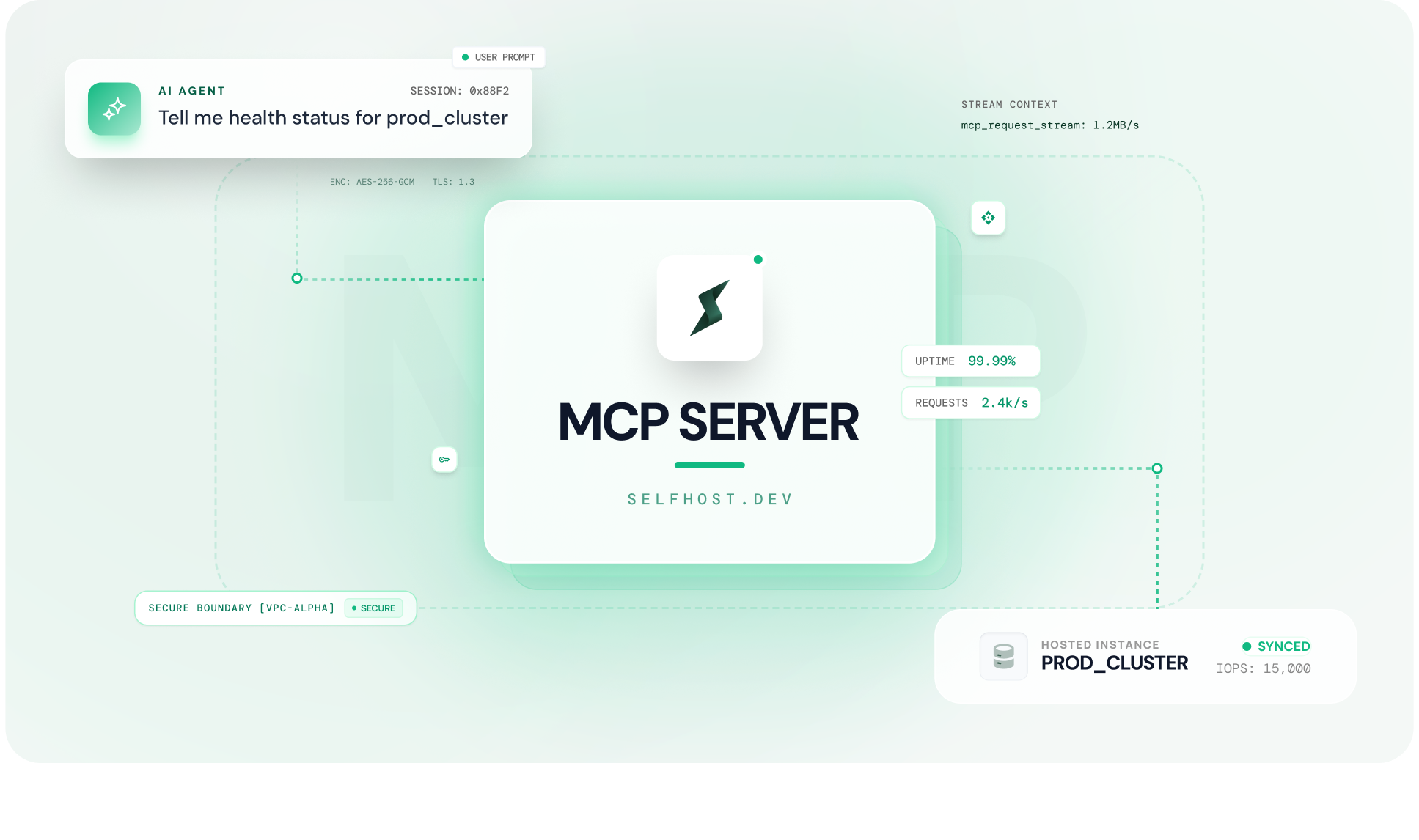
If you manage PostgreSQL in production, you already know the routine.
Provisioning lives in one dashboard. Monitoring lives in another. Backups, alerts, scaling, configuration, each one buried inside a different tab, a different console, a different vendor interface. And your AI coding agent, the tool that is supposed to make your workflow faster, cannot see or touch any of it.
A PostgreSQL MCP server changes that. It connects your AI coding agent such as Claude, Cursor, Windsurf, Cline etc. directly to your database infrastructure. Not just to query data, but to provision instances, manage backups, configure parameters, set up alerts, and scale resources. All through natural language. All from inside your editor.
MCP (Model Context Protocol) is an open protocol, originally introduced by Anthropic, that gives AI agents a standardised way to communicate with external tools and services. A PostgreSQL MCP server is a specific implementation of that protocol, one that brings your entire database operations layer into your AI assistant.
This guide covers everything: what a PostgreSQL MCP server is, how it works, how to set one up with every major AI coding tool, how to evaluate different options, and what real database workflows look like when your AI agent can manage your infrastructure directly.
Whether you are a solo developer running your own PostgreSQL instance, a startup team without a dedicated DBA, or a platform engineer managing databases across environments, this is the guide that gets you from “I have heard of MCP” to “my AI agent is managing my database infrastructure.”
If you are running a managed database in your own cloud account using a BYOC model, the security and architecture implications are especially relevant, and we have covered those in detail.
Table of Contents
What Is a PostgreSQL MCP Server?
Quick Answer
A PostgreSQL MCP server connects your AI coding agent (Claude, Cursor, Windsurf, Cline) directly to your database infrastructure. It allows you to manage provisioning, monitoring, backups, scaling, and configuration using natural language instead of cloud dashboards.
Key Capabilities
- Connects AI coding agents directly to PostgreSQL infrastructure
- Enables provisioning, monitoring, scaling, backups, and configuration through natural language
- Acts as a bridge between your AI assistant and database operations layer
- Translates plain English requests into real infrastructure actions
- Removes context switching by bringing database management into your editor
- Supports AI-assisted alerting, backup management, and configuration tuning
- Requires explicit confirmation for destructive actions (delete, stop, reboot)
What It’s Best For
- Database operations and infrastructure management
- DevOps workflows involving PostgreSQL
- Teams managing multiple environments without dedicated DBAs
What It’s Not Designed For
- Executing SQL queries against your data
- Query-level interactions (use tools like pgEdge or DBHub instead)
Simple Way to Think About It
A query-focused MCP server replaces your SQL client.
A full-platform PostgreSQL MCP server replaces your cloud management console, including AWS RDS dashboards, monitoring tools, alerting systems, and backup managers.
Instead of switching between multiple tabs, every database operation becomes a conversation with your AI agent.
Understanding the MCP Protocol for PostgreSQL
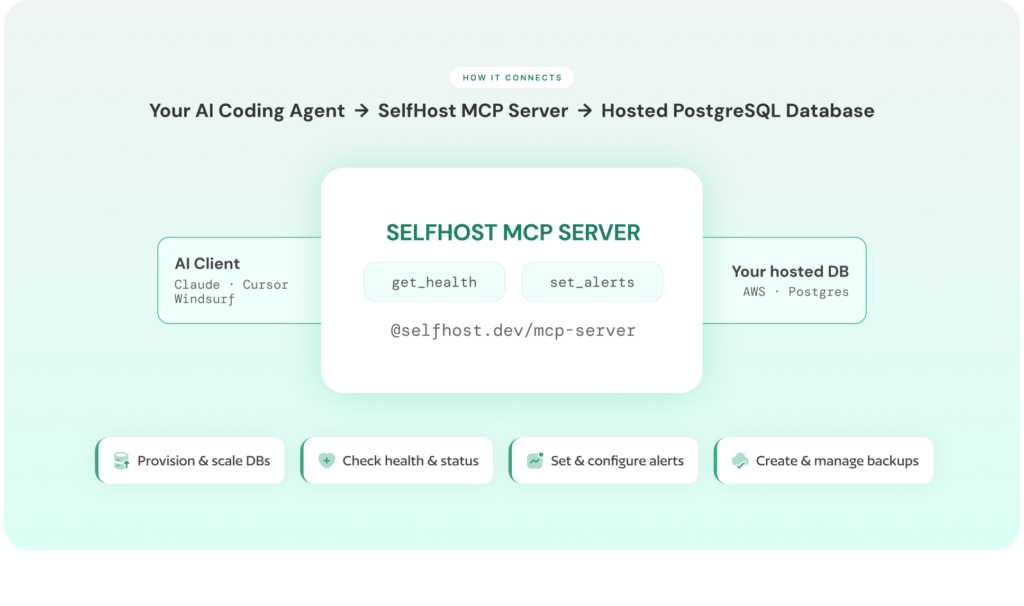
What Is MCP (Model Context Protocol)?
MCP (Model Context Protocol) is an open standard that allows AI coding agents to communicate with external tools and data sources using a shared language.
Why MCP Exists
Before MCP, every AI tool required separate integrations for each service:
- One integration for your database
- Another for monitoring tools
- Another for your cloud provider
Each integration was built, maintained, and updated independently, leading to fragmentation and frequent breakage.
MCP solves this by introducing a single protocol that works across tools and services.
How MCP Works
- AI clients (Claude, Cursor, Windsurf, Cline) speak the MCP protocol
- External services implement MCP-compatible servers
- One MCP server works across multiple AI tools
What a PostgreSQL MCP Server Does
A PostgreSQL MCP server is an implementation of MCP for database infrastructure.
- Acts as a bridge between your AI agent and PostgreSQL operations
- Translates natural language into infrastructure API calls
- Connects your editor directly to your database environment
Your AI speaks natural language
Your infrastructure responds via APIs
The MCP server translates between the two
Example Workflow
Prompt:
“Spin up a PostgreSQL instance in us-east-1 with 100GB storage.”
What happens:
- MCP server converts this into API calls
- Shows configuration options and cost estimates
- Waits for confirmation
- Provisions the instance
No dashboards. No manual navigation.
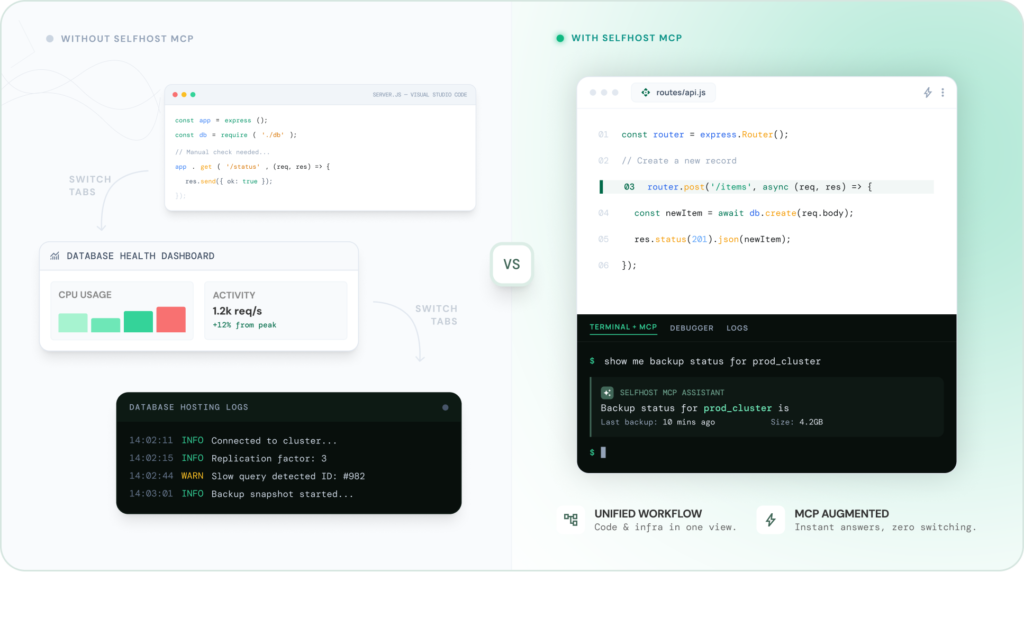
Without vs With a PostgreSQL MCP Server
Without MCP:
- AI can explain concepts
- Suggest configurations
- Generate documentation
- Cannot access real infrastructure
With MCP:
- AI sees your actual database instances
- Accesses configuration, backups, and alerts
- Monitors performance and resource usage
- Executes real operations (provision, scale, tune, monitor)
Works with real environment, not assumptions
Key Takeaway
A PostgreSQL MCP server turns your AI assistant from a passive advisor into an operational tool that can directly manage your database infrastructure.
Why Developers Are Connecting AI Agents to PostgreSQL Infrastructure
The Dashboard Problem: Why Database Management Still Means Tab Switching
A typical database workflow today still revolves around dashboards, not code.
You are working inside your editor when you need to check your production database. Maybe CPU usage looks suspicious. You open the AWS RDS console, navigate to the instance, and wait for the monitoring graphs to load. CPU seems stable, but disk usage is climbing. To check backups, you switch to another section. The last backup ran 18 hours ago. Updating that policy means navigating yet another interface — possibly even a different service like AWS Backup.
Then there is staging. You remember a test instance is still running. You go back to the instances list, find it, stop it, confirm the action, and wait.
None of this required writing code. But every step required leaving your editor.
That is the real problem.
Research by Gloria Mark at the University of California, Irvine shows that after an interruption, it can take around 20–25 minutes to return to the original task. Even small interruptions, loading dashboards, clicking through menus, break your flow. Over a week, this compounds into hours lost to infrastructure navigation.
A PostgreSQL MCP server removes this friction entirely. Your AI coding agent becomes your interface. You stay in your editor, describe what you need in plain English, and the action happens inline, without opening a single dashboard.
What You Can Do With a PostgreSQL MCP Server
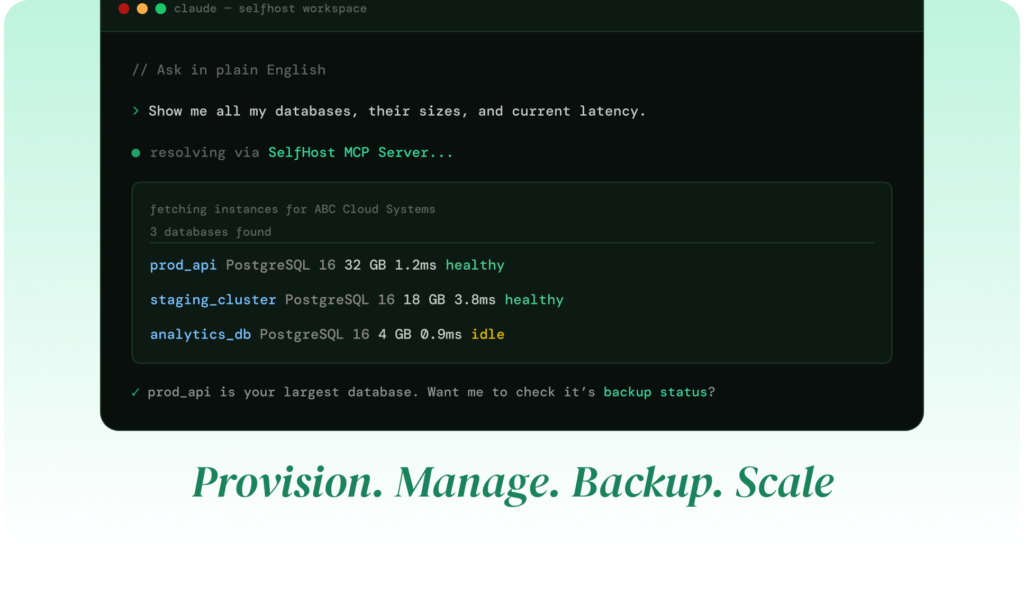
This is not a theoretical improvement. It fundamentally changes how database operations are performed.
Instead of navigating dashboards, you describe intent and your AI executes it.
Here’s how that plays out in real workflows:
Provision and Scale Infrastructure Through Conversation
Creating a new database no longer means stepping through a multi-page wizard.
You describe what you need, a PostgreSQL instance, region, storage and the MCP server handles configuration, shows a cost estimate, and provisions it after confirmation.
What used to take multiple screens and decisions becomes a single interaction.
Monitor Database Health Without Leaving Your Editor
Instead of opening CloudWatch or Grafana, you ask:
How is the production database doing?”
Your AI returns a summary of CPU, memory, disk usage, replication lag, and connections — instantly.
No dashboards. No waiting.
Manage Backups and Snapshots as Commands
Backup workflows become conversational:
- View existing backups
- Create snapshots before deployment
- Update backup policies
All handled directly through your AI agent, without switching tools.
Set Up Alerts and Notifications in Seconds
Monitoring setup becomes dramatically simpler.
Instead of configuring thresholds, channels, and integrations across multiple screens, you describe the condition:
“Alert me if CPU exceeds 80% for 5 minutes.”
The MCP server handles the entire setup including notification routing and validation.
Handle Scaling, Configuration, and Tuning
Infrastructure changes that usually require deep navigation, resizing instances, enabling multi-AZ, tuning PostgreSQL parameters,become one-line requests.
The MCP server calculates defaults, applies overrides, and ensures consistency across replicas automatically.
Run Advanced Workflows Like Cloning and Access Management
More complex operations are also simplified:
- Clone production databases for testing
- Manage team access and roles
- Configure networking and security rules
These workflows, which normally span multiple services and interfaces, become part of a single conversation.
The Common Pattern
Every action that previously required switching to a cloud dashboard can now be executed through your AI agent.
Your database infrastructure stops being a separate destination and becomes part of your development workflow.
If you are already managing PostgreSQL on AWS RDS, you have experienced how these interactions add up over time. The MCP server does not just reduce effort, it removes the operational overhead entirely.
How a PostgreSQL MCP Server Works Under the Hood
How the MCP Protocol Works: One Server, Any AI Client
MCP plays the same role for AI tools that REST plays for web applications.
Before REST, every service used its own protocol, SOAP, XML-RPC, custom integrations. Each required separate handling. REST unified this into a standard pattern.
MCP does the same for AI agents.
It defines a consistent way for AI clients to:
- discover available tools
- request actions
- receive structured responses
The AI does not need to know how the system works internally. It only needs to speak the protocol.
Why This Matters
This standardisation unlocks two important advantages.
First, portability.
You set up a PostgreSQL MCP server once, and it works across all compatible AI tools. Switching from Cursor to Claude does not require rebuilding integrations.
Second, composability.
You can connect your AI agent to multiple systems, databases, repositories, CI/CD pipelines, each through its own MCP server.
That allows multi-step workflows like:
“Check if the database has enough disk space for today’s deployment, and resize it if needed.”
This is not a single action. It is coordination across systems, made possible through MCP.
What Happens When You Ask Your AI Agent to Manage Your Database
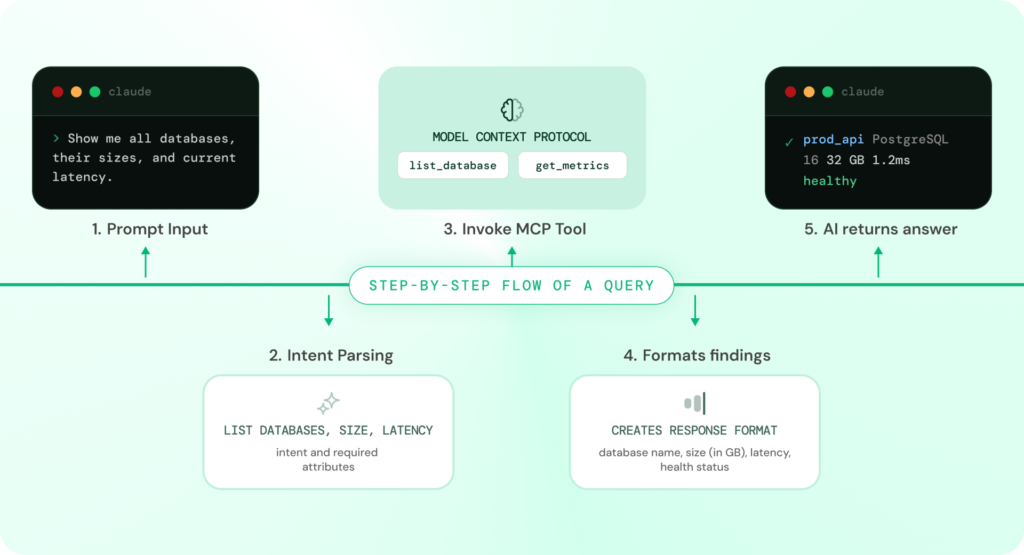
Step-by-Step Flow of an MCP Interaction
When you send an infrastructure request through your AI coding tool, a structured sequence happens behind the scenes. Here is the exact flow:
Step 1: Natural Language Prompt
You start by describing what you need in plain English:
“Create an alert if replication lag exceeds 30 seconds on my production database.”
Step 2: AI Identifies the Required Tool
Your AI coding agent recognises that this request requires database infrastructure access.
It scans available MCP servers and selects the PostgreSQL MCP server as the appropriate tool.
Step 3: Structured Tool Call
Instead of making a raw API request, the AI generates a structured tool call:
Use create_alert_rule with:
metric = replication_lag
threshold = 30 seconds
instance = production
Step 4: MCP Server Processes the Request
The PostgreSQL MCP server:
- Validates authentication
- Checks organisation context and permissions
- Applies rate limits
- Translates the request into the correct infrastructure API call
Step 5: Infrastructure Executes the Action
The database infrastructure processes the request and returns a result:
- Alert rule created
- ID assigned
- Configuration stored
Step 6: Response Returned to AI
The MCP server sends structured output back to the AI agent, which formats it into a human-readable response:
“Alert created: replication lag > 30 seconds on production → notifying ops-team channel. Currently monitoring. Replication lag is at 0.3 seconds.”
What This Means in Practice
The entire process takes seconds.
You do not open a monitoring dashboard.
You do not configure alerts manually.
You do not leave your editor.
Because the AI has real context, your instances, alert rules, and notification channels, every action is grounded in your actual infrastructure, not assumptions.
System Flow Overview
User Prompt → AI Client → MCP Server → Infrastructure API → Response → AI Output
Tools, Resources, and Prompts: The Core Building Blocks of MCP
Every PostgreSQL MCP server is built on three fundamental components. These define what your AI can do, what it can see, and how it interacts with your infrastructure.
1. Tools (Actions the AI Can Take)
Tools are executable actions, the verbs of the system.
They allow your AI agent to perform operations such as:
- Provisioning database instances
- Creating backups and snapshots
- Setting up alerts
- Updating configurations
- Scaling infrastructure
- Forking databases
- Starting or stopping instances
Whenever you ask your AI to perform an action, it invokes a tool.
2. Resources (Data the AI Can Access)
Resources are the data layer, the nouns.
They provide the context your AI needs to make decisions:
- Running database instances
- Backup history
- Alert rules
- Organisation members
- Cloud credentials
When your AI answers a question or prepares an action, it reads from these resources.
3. Prompts (Pre-Structured Workflows)
Prompts are reusable templates that guide interactions.
They act as structured starting points for common workflows, such as:
- Setting up a production database
- Reviewing backup coverage
- Preparing for a deployment
Instead of starting from scratch, prompts help the AI follow consistent patterns.
Why This Structure Matters
The combination of tools, resources, and prompts defines the capability of a PostgreSQL MCP server.
- Tools → what actions are possible
- Resources → what context is available
- Prompts → how workflows are structured
Together, they determine how much of your database lifecycle your AI can actually manage.
From Limited Tools to Full Infrastructure Control
Most PostgreSQL MCP servers available today expose only 2 to 10 tools.
That is enough for:
- querying data
- inspecting schemas
But not enough for full infrastructure management.
You still need:
- dashboards for monitoring
- separate tools for alerts
- additional interfaces for backups and scaling
What Changes with a Full-Platform MCP Server
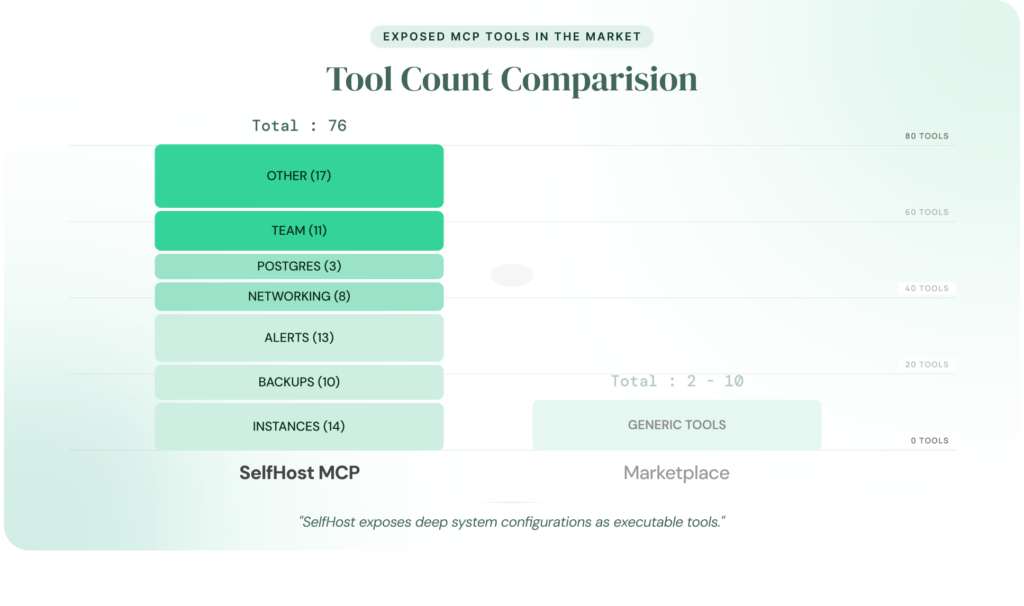
A comprehensive PostgreSQL MCP server expands this capability significantly.
SelfHost’s PostgreSQL MCP server exposes:
- 76 tools across 8 modules
- Full lifecycle coverage:
- provisioning
- monitoring
- alerting
- backups
- configuration
- networking
- team management
The difference is not incremental, it is structural.
A limited MCP server lets your AI observe.
A full-platform MCP server lets your AI operate.
SelfHost’s PostgreSQL MCP Server Modules and Capabilities
The following breakdown shows how SelfHost’s PostgreSQL MCP server organises its infrastructure capabilities across core modules.
| Module | What It Covers | Example Tools |
|---|---|---|
| Authentication & Users | Sign-in, profile, org membership | create_or_login_user, get_current_user |
| Organisations & Teams | Multi-tenant access control, audit logs | list_members, invite_to_org, list_activity_logs |
| Cloud Credentials | BYOC AWS account management | add_credential, get_aws_account_info |
| Networking | VPCs, subnets, security groups | create_vpc, create_security_group |
| Database Instances | Full lifecycle — provision to delete | create_instance, fork_instance, estimate_instance_cost |
| PostgreSQL Configuration | Parameter tuning with calculated defaults | preview_pg_config, update_pg_config |
| Backups & Snapshots | Automated policies + manual snapshots | create_backup_policy, create_snapshot |
| Alerts & Notifications | Monitoring rules + email channels | create_alert_rule, test_notification_channel |
The difference is not just in the number of tools, it is in what your AI can actually do.
A limited MCP server gives your AI visibility.
A full-platform PostgreSQL MCP server gives it operational control.
Most developers managing PostgreSQL today eventually question whether their current managed setup scales with their needs. If you are evaluating that tradeoff, our comparison of managed vs self-hosted databases breaks down the decision and shows how a full-platform MCP server fundamentally changes the operational complexity involved.
The difference is not just quantity. A 2-tool MCP server gives your AI a flashlight. A 76-tool PostgreSQL MCP server gives it the keys to the building.
PostgreSQL MCP Server vs Cloud Dashboard: What Actually Changes
Before setting up a PostgreSQL MCP server, it helps to understand how it compares to the traditional way of managing databases: cloud dashboards like the AWS RDS console, Azure Database portal, or Google Cloud SQL interface.
Both approaches let you manage your infrastructure. But they optimise for very different workflows. One is built for clicking
through graphical interfaces. The other is built for conversational, AI-assisted operations.
Here is a side-by-side comparison across the dimensions that matter in real-world usage:
| Dimension | Cloud Dashboard | PostgreSQL MCP Server |
|---|---|---|
| Interface | Browser-based GUI with multiple pages and tabs | Natural language in your editor |
| Context switching | Leave editor → open browser → navigate console → return | Stay in editor the entire time |
| Provisioning | Multi-step wizard with dropdowns, checkboxes, and confirmation screens | One conversation — describe, review cost, confirm |
| Monitoring | Navigate to monitoring tab, wait for graphs, interpret visually | “How is production doing?” → instant summary |
| Alerting | Configure thresholds and notification channels across multiple screens | “Alert me if CPU exceeds 80%” → done |
| Backups | Set schedules and manage backups through separate interfaces | “Show backups” or “Set daily backups” → done |
| Scaling | Modify instance type through settings and confirm changes | “Upgrade staging instance” → confirm → done |
| Configuration | Edit parameter groups or SSH into instances | Preview defaults → apply → auto-sync |
| Team access | Manage access via IAM or separate systems | “Invite engineer with role” → done |
| Audit trail | Search through CloudTrail or vendor logs | “Show activity log” → structured output |
| Speed per action | 1–5 minutes depending on complexity | 5–30 seconds per interaction |
| Learning curve | Learn provider-specific UI and navigation | Describe actions in plain English |
| Multi-instance management | Switch tabs or navigate between instances | “List all instances” → grouped summary |
Here’s what that difference looks like in practice:
Key Takeaway
A PostgreSQL MCP server does not replace your cloud dashboard entirely, it changes how you interact with your infrastructure for the majority of daily operations.
Cloud dashboards are still the right choice for:
- Initial cloud account setup and IAM configuration
- Complex networking configurations you want to visualise graphically
- Deep-dive troubleshooting that requires interactive graph exploration
- Operations outside the MCP server’s tool coverage
But for day-to-day database operations, provisioning, monitoring, alerting, backups, scaling, configuration, team management, a PostgreSQL MCP server turns 15 clicks and 3 dashboard pages into a single sentence in your editor.
The cost side of this equation matters too. Teams that manage their own infrastructure through a BYOC model already save significantly compared to fully managed providers. Our breakdown of why AWS RDS is expensive covers the pricing side a PostgreSQL MCP server addresses the operational overhead side.
What to Look for in a PostgreSQL MCP Server
Not all PostgreSQL MCP servers are built the same. If you are evaluating one for production use, the differences go beyond features, they affect control, security, and how much of your database lifecycle your AI can actually manage.
Before choosing a solution, there are a few critical questions worth asking.
Read-Only vs Full Infrastructure Access
Most PostgreSQL MCP servers today are limited to read-only access. They allow your AI agent to inspect schema or query data, but stop short of managing infrastructure. There is no provisioning, no scaling, no configuration changes, and no alert management.
For simple workflows, that is enough.
But if your goal is to manage the full lifecycle of your database, provisioning instances, configuring parameters, managing backups, setting up monitoring, you need infrastructure-level access.
The real question is not whether to allow operational access, but how safely it is implemented.
A production-ready PostgreSQL MCP server should include clear guardrails:
- Destructive operation controls. Actions like delete, stop, or reboot should always require explicit confirmation. The system must show exactly what will happen before execution, no silent actions, no implicit approvals.
- Role-based access control. Teams should be able to assign permissions across environments, ensuring that not every user can perform every action.
- Audit logging. Every action should be recorded, who initiated it, what was executed, and when especially for compliance-heavy environments.
- Credential management. Authentication should be secure but frictionless, with automatic token refresh and restricted local storage.
These safeguards define whether your AI agent can operate safely in a production environment.
Where Does the PostgreSQL MCP Server Run? (And Why It Matters for BYOC)
This is one of the most overlooked and most important architectural decisions.
Every request your AI agent makes must travel from your machine to your database infrastructure. The question is simple: what systems does that request pass through?
There are three common deployment models:
Local (Runs on Your Machine)
The MCP server runs directly on your system, and requests are sent straight to your infrastructure.
- No third-party systems in the request path
- Full control over credentials and data flow
- Aligns naturally with BYOC architectures
This is the model SelfHost uses.
Vendor-Hosted
The MCP server runs on the provider’s infrastructure.
- Requests are routed through external systems
- Credentials and metadata may pass through vendor-controlled environments
- Less control over data boundaries
In-Cloud (Runs in Your VPC)
The MCP server is deployed inside your own cloud environment.
- More control than vendor-hosted
- Still requires infrastructure management on your end
- Useful for teams with strict network isolation requirements
Why This Decision Matters
For teams operating under compliance frameworks, this is not just a technical detail, it defines your security boundary.
If your database is designed to run entirely within your own cloud account (BYOC), routing MCP requests through third-party systems breaks that assumption. It introduces an additional layer where sensitive data and operations are exposed.
A locally running MCP server preserves that boundary. Requests go directly from your environment to your infrastructure, without external intermediaries.
How This Applies in Practice
SelfHost’s PostgreSQL MCP server follows a local-first model:
- Runs on your machine
- Authenticates via browser-based login
- Connects directly to your infrastructure
- Stores credentials locally with restricted permissions (
chmod 0600) - Automatically redacts sensitive fields such as passwords, API keys, and tokens
This ensures that infrastructure operations remain within your control at all times.
Key Takeaway
If you are running PostgreSQL in a BYOC setup, where your infrastructure is meant to stay within your own cloud account, the MCP server’s deployment model is not optional — it is foundational.
Choosing where the MCP server runs directly determines whether your architecture remains secure, compliant, and aligned with that model.
For a deeper breakdown of BYOC architecture and its implications, see: What Is BYOC? A Smarter Alternative to Expensive Managed Databases
How Many Tools Does a PostgreSQL MCP Server Actually Expose?
The number of tools a PostgreSQL MCP server exposes directly defines what your AI agent can actually do with your infrastructure.
Here is how the current landscape breaks down:
| Tool Count | What Your AI Agent Can Do | What You Still Need Dashboards For |
|---|---|---|
| 2–5 tools | Run queries, inspect schema | Monitoring, alerting, backups, provisioning, scaling, configuration, team management |
| 6–15 tools | Queries + basic monitoring or instance info | Alerting, backups, provisioning, configuration, team management |
| 15–30 tools | Queries + monitoring + some instance management | Alerting, backups, full configuration, team management |
| 76 tools | Full lifecycle — provisioning, monitoring, alerting, backups, configuration, scaling, networking, team management | Almost nothing |
A 2–tool MCP server means your AI can peek at your database. A 76–tool PostgreSQL MCP server means your AI can run your database operations end to end.
The more your AI agent can do without you switching tools, the more time you spend building and the less time you spend navigating dashboards.
PostgreSQL MCP Server Setup: Claude Code, Cursor, Windsurf, Cline, and VS Code
Setting up a PostgreSQL MCP server follows the same general pattern regardless of which AI coding tool you use: add the server configuration to your client’s settings, and authenticate on first run.
We will walk through the setup for each major AI coding tool using SelfHost’s MCP server as the example. It covers the broadest set of capabilities (76 tools across 8 modules), and the protocol-level setup pattern is identical to what you would do with any other PostgreSQL MCP server.
Prerequisites:
- A SelfHost.dev account (invite-only, ask an existing user or join the waitlist)
- Node.js 18+ or Bun
Authentication: On first use, the PostgreSQL MCP server opens your browser to sign in via SelfHost’s console. After you authorise, credentials are saved locally at ~/.selfhost/credentials.json and auto-refreshed. You will not need to sign in again.
Setup With Claude Code
Claude Code supports MCP servers through its CLI. Run one command:
Using npm (Node.js):
claude mcp add selfhost — npx @selfhost.dev/mcp-server
Using Bun:
claude mcp add selfhost — bunx @selfhost.dev/mcp-server
On the next session start, Claude Code will automatically discover the PostgreSQL MCP server. Your browser opens for authentication on first use. After that, all 76 tools are available in your coding sessions.
Test it: Type “Show me my databases” in your next Claude Code session. If the setup is correct, Claude will authenticate, fetch your organisations, and display your instances inline.
Setup With Claude Desktop
Step 1: Open your Claude Desktop MCP configuration file at:
- macOS: ~/Library/Application Support/Claude/claude_desktop_config.json
- Windows: %APPDATA%\Claude\claude_desktop_config.json
Step 2: Add the following configuration:
Using npm:
{
"mcpServers": {
"selfhost": {
"command": "npx",
"args": ["@selfhost.dev/mcp-server"]
}
}
}
Using Bun:
{
"mcpServers": {
"selfhost": {
"command": "bunx",
"args": ["@selfhost.dev/mcp-server"]
}
}
}
Step 3: Restart Claude Desktop. Close and reopen the application. Claude will detect the new PostgreSQL MCP server on startup.
Step 4: Test the connection. Type “Show me my databases.” If the setup is correct, Claude will call the MCP server, authenticate via your browser, and display your instances inline.
Setup With Cursor
Add the configuration to your project’s .cursor/mcp.json file or go to Settings → MCP Servers:
{
"mcpServers": {
"selfhost": {
"command": "npx",
"args": ["@selfhost.dev/mcp-server"]
}
}
}
Or with Bun:
{
"mcpServers": {
"selfhost": {
"command": "bunx",
"args": ["@selfhost.dev/mcp-server"]
}
}
}
Restart Cursor. On first use, your browser opens for authentication. After that, you can ask Cursor’s AI to provision, monitor, and manage your PostgreSQL infrastructure directly from the editor.
Setup With Windsurf
Windsurf supports MCP through its Cascade AI assistant. The configuration goes in Windsurf’s MCP settings file:
{
"mcpServers": {
"selfhost": {
"command": "npx",
"args": ["@selfhost.dev/mcp-server"]
}
}
}
Or with Bun:
{
"mcpServers": {
"selfhost": {
"command": "bunx",
"args": ["@selfhost.dev/mcp-server"]
}
}
}
If you have been looking for Windsurf-specific MCP documentation, you have probably noticed there is not much out there yet. Windsurf’s MCP support follows the same protocol standard, so the configuration pattern is identical. The only difference is the file location within Windsurf’s settings directory.
Setup With Cline
Cline supports MCP servers natively. Add the configuration to Cline’s MCP settings:
{
"mcpServers": {
"selfhost": {
"command": "npx",
"args": ["@selfhost.dev/mcp-server"]
}
}
}
Or with Bun:
{
"mcpServers": {
"selfhost": {
"command": "bunx",
"args": ["@selfhost.dev/mcp-server"]
}
}
}
Restart Cline. Authentication happens through your browser on first use, same as every other client. After that, the full PostgreSQL MCP server toolset is available in your Cline sessions.
Setup With VS Code Copilot
VS Code supports MCP servers through its Copilot agent mode. Add the configuration to your workspace’s .vscode/mcp.json or your user-level settings:
{
"mcpServers": {
"selfhost": {
"command": "npx",
"args": ["@selfhost.dev/mcp-server"]
}
}
}
Or with Bun:
{
"mcpServers": {
"selfhost": {
"command": "bunx",
"args": ["@selfhost.dev/mcp-server"]
}
}
}
Important: VS Code Copilot handles MCP tool calls through its agent mode, which means you need to be in an agent-enabled conversation for MCP tools to be available. Standard Copilot inline completions do not trigger MCP calls.
How Long Does Setup Take?
Under 5 minutes for any client. The process is:
- Install the npm package (or use Bun — no install needed with bunx)
- Add the JSON configuration block to your AI client’s settings file
- Restart the client
- Authenticate via browser on first use
There is no API key to generate, no infrastructure to provision, no Docker containers to run, and no cloud services to configure. The PostgreSQL MCP server runs locally on your machine and handles authentication, token refresh, and organisation context automatically.
If you need to run the MCP server in a headless or CI environment where browser login is not possible, you can set FIREBASE_API_KEY and FIREBASE_REFRESH_TOKEN environment variables to skip the browser flow. These values are available in ~/.selfhost/credentials.json after your first browser login.
PostgreSQL MCP Servers Compared: SelfHost vs Alternatives
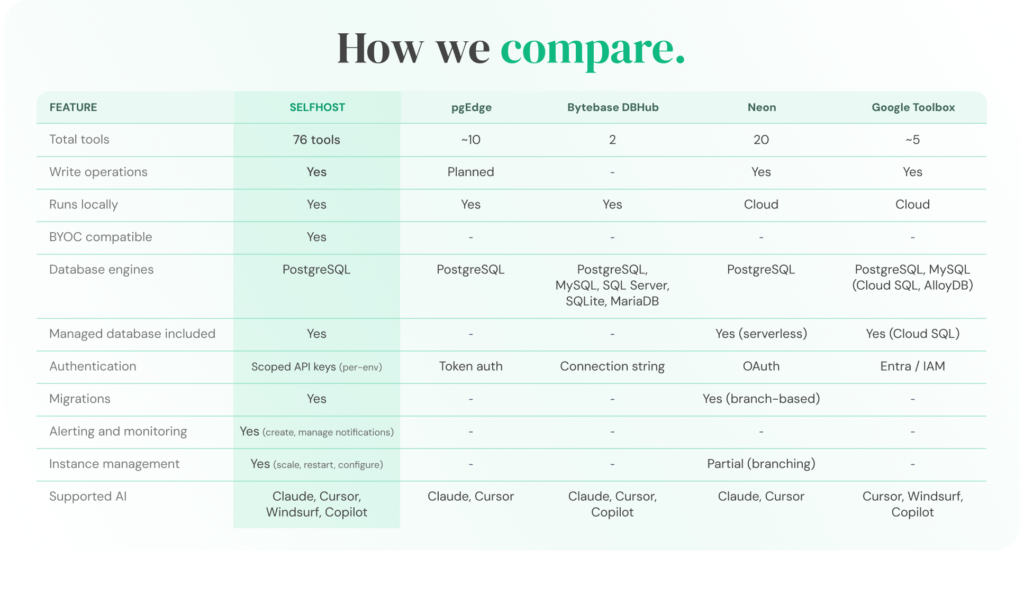
The PostgreSQL MCP server landscape is still early. Most options launched in late 2025 or early 2026, and the capabilities vary dramatically, from 2-tool query bridges to 76-tool infrastructure platforms.
Here is a direct comparison across the dimensions that matter when choosing a PostgreSQL MCP server:
| Feature | SelfHost | Neon | pgEdge | Bytebase DBHub | Google MCP Toolbox |
|---|---|---|---|---|---|
| Tool count | 76 | ~10 | ~8 | 2 | ~12 |
| Primary function | Full infrastructure management | Query + branch-based dev workflows | Query + schema inspection | Read-only query bridge | Query + Google Cloud management |
| Supported databases | PostgreSQL, MySQL, MongoDB | PostgreSQL (Neon-hosted only) | PostgreSQL | PostgreSQL, MySQL, MongoDB, SQLite, and more | Cloud SQL, AlloyDB |
| Instance provisioning | Yes (full lifecycle with cost estimation) | No (managed internally) | No | No | Limited (Google Cloud only) |
| Backup management | Yes (automated + manual) | No (platform-managed) | No | No | Limited |
| Alert management | Yes (rules, notifications, acknowledgement) | No | No | No | No |
| PostgreSQL config tuning | Yes (calculated defaults, auto-sync) | No | No | No | No |
| Networking | Yes | No | No | No | Partial (Google Cloud) |
| Team & org management | Yes (multi-tenant roles) | No | No | No | Via Google IAM |
| Audit logging | Yes (activity logs) | No | No | No | Via Google Cloud Audit |
| BYOC compatible | Yes (AWS) | No (hosted) | N/A | N/A | No |
| Runs locally | Yes | Yes | Yes | Yes | No |
| Write operations | Yes (with confirmation gating) | Yes (branch-based) | No (read-only) | No (read-only) | Limited |
| Managed database included | Yes | Yes (serverless PG) | No | No | Yes (Cloud SQL / AlloyDB) |
| AI client support | Claude, Cursor, Windsurf, Cline, MCP clients | Claude Desktop, Cursor | MCP clients | MCP clients | Gemini, Vertex AI |
| Pricing model | Free tier + usage-based | Existing pricing | Open source | Open source | Google Cloud pricing |
How Each PostgreSQL MCP Server Fits Different Use Cases
Not all PostgreSQL MCP servers are built for the same purpose. Each tool sits at a different point on the spectrum from simple query interfaces to full infrastructure management.
Understanding where each one fits helps you choose the right tool for your workflow.
Bytebase DBHub: Lightweight, Multi-Database Query Access
Bytebase DBHub is the simplest option, offering just two tools but supporting a wide range of database engines including PostgreSQL, MySQL, MongoDB, SQLite, and others.
It works well as a read-only MCP bridge when you need quick access across multiple databases without setup overhead.
However, its scope is intentionally limited. It does not handle provisioning, monitoring, backups, or configuration. It functions as a query interface, not a database operations layer which means dashboards remain necessary for anything beyond data access.
pgEdge: PostgreSQL-Focused Inspection and Exploration
pgEdge is designed specifically for PostgreSQL and provides capabilities around schema inspection and basic performance insights.
It is useful for understanding database structure and reviewing system state, especially in read-only contexts.
That said, it does not support write operations or infrastructure management. You connect it to your existing PostgreSQL instance, but continue to rely on external tools for provisioning, scaling, and operational workflows.
Neon: Branch-Based Development for Hosted PostgreSQL
Neon’s MCP integration is built around its serverless PostgreSQL platform.
Its standout feature is branch-based database development allowing you to create isolated database branches similar to Git workflows. This is particularly useful for testing, migrations, and parallel development environments.
The limitation is scope. Neon’s MCP server only works with databases hosted on Neon itself. If your infrastructure runs on AWS, Azure, or your own environment, this model does not apply.
Google MCP Toolbox: Integrated with Google Cloud Ecosystem
Google MCP Toolbox is designed for teams using Cloud SQL or AlloyDB within the Google Cloud ecosystem.
It integrates closely with tools like Gemini and Vertex AI, and provides some infrastructure-level capabilities within that environment.
However, it is tightly coupled to Google Cloud. It does not support non-Google AI clients such as Claude Desktop, and it cannot be used with databases hosted outside Google’s infrastructure.
SelfHost: Full-Platform MCP for Infrastructure Management
SelfHost takes a broader approach, focusing on complete database lifecycle management.
It offers the largest tool surface (76 tools across 8 modules) and is the only option in this comparison that supports a BYOC (Bring Your Own Cloud) model allowing you to run databases directly in your own cloud account while managing them through an MCP interface.
The platform covers provisioning, monitoring, alerting, backups, configuration tuning, networking, and team management, and supports PostgreSQL, MySQL, and MongoDB.
The tradeoff is positioning. The MCP server is designed for infrastructure operations, not direct SQL querying. For query-heavy workflows, it pairs best with a query-focused MCP server such as DBHub or pgEdge.
Additionally, the platform is currently invite-only, which may limit immediate access for some teams.
Choosing the Right PostgreSQL MCP Server
There is no single best option, the right PostgreSQL MCP server depends on what you expect your AI agent to do.
- If your needs are limited to querying data across multiple database types, a lightweight, read-only bridge is often sufficient: Bytebase DBHub fits this use case
- If you are working specifically with PostgreSQL and need schema inspection or basic visibility into your database, a PostgreSQL-focused read-only tool is more appropriate: pgEdge is designed for this.
- If your workflow is built around branch-based database development and you are already using a hosted platform, an MCP server integrated with that environment can simplify testing and migrations: Neon MCP works well in this context.
- If your infrastructure is entirely within Google Cloud and you want tight integration with tools like Gemini or Vertex AI, an MCP server aligned with that ecosystem makes sense: Google MCP Toolbox is built for that setup.
But if your goal is to move beyond visibility and allow your AI agent to actively manage your database infrastructure the requirements change.
In that case, you need a full-platform PostgreSQL MCP server that can handle provisioning, monitoring, alerting, backups, scaling, configuration, networking, and team access all within your editor, while keeping your data inside your own cloud environment: SelfHost is designed for this model.
The Real Decision
The choice ultimately comes down to a simple distinction:
Do you want your AI to see your database or to manage it?
Most PostgreSQL MCP servers provide visibility.
A full-platform MCP server enables control.
Where This Fits in the Bigger Picture
For teams already evaluating whether to rely on fully managed database services or take more ownership of their infrastructure, this distinction becomes critical.
A detailed comparison of managed vs self-hosted databases breaks down the architectural tradeoffs. What changes with a full-platform PostgreSQL MCP server is the operational side of that decision significantly reducing the complexity traditionally associated with managing your own infrastructure.
Real Workflows: What Using a PostgreSQL MCP Server Actually Looks Like
Setup guides explain how to connect. This section shows what happens after that.
Every workflow below uses real tools from SelfHost’s PostgreSQL MCP server with exact tool names referenced so you can map each step to actual functionality. Nothing here is theoretical.
Provisioning a New Database Without Opening a Dashboard
Traditional Workflow vs MCP Workflow
Provisioning a new database typically involves navigating multiple dashboard screens selecting instance types, storage, networking, and security configurations across several steps.
With a PostgreSQL MCP server, the same process becomes conversational.
Example Interaction
You:
“I need a new PostgreSQL 16 staging database in us-east-1. Something mid-range — maybe r6g.large with 100GB gp3 storage.”
AI:
Calls estimate_instance_cost → returns itemised monthly cost.
- Compute (r6g.large): $X/month
- Storage (100GB gp3): $X/month
- Total: $X/month
“Here is the cost estimate. Want me to proceed?”
You:
“Yes, go ahead.”
AI:
Calls create_instance → provisions database → returns connection details.
What Changes
Provisioning shifts from a multi-step dashboard workflow to a single interaction.
- Cost visibility comes first
- Configuration is guided
- No navigation between services
Total time: under two minutes
Dashboard pages opened: zero
Forking Production for Safe Testing
Why This Matters
Testing against real data usually requires snapshots, cloning, and manual configuration across multiple interfaces.
Example Interaction
You:
“Fork my production database into a new instance for testing.”
AI:
Calls list_instances → identifies production
Calls fork_instance → creates independent clone
“Done. New instance created: prod-fork-apr-02. Changes here won’t affect production.”
What Changes
- Independent environment created instantly
- Separate credentials generated automatically
- No risk to production
Setting Up Monitoring and Alerts Before a Deployment
From Dashboard Configuration to Conversation
Monitoring setup traditionally spans multiple interfaces metrics, alerts, and notification channels.
Example Interaction
You:
“How is the production database doing right now?”
AI:
Calls get_instance → returns metrics summary
You:
“Set alerts for CPU > 80% (5 min) and disk > 85%. Notify ops team.”
AI workflow:
list_notification_channelscreate_notification_channeltest_notification_channelcreate_alert_rule(CPU)create_alert_rule(disk)
What Changes
A complete monitoring setup including validation happens in one interaction.
- No manual configuration screens
- No cross-tool setup
- Immediate feedback
Tuning PostgreSQL Configuration Without SSH
From Manual Tuning to Calculated Defaults
Traditionally, tuning requires:
- SSH access or parameter groups
- Manual calculation of values
- Synchronisation across replicas
Example Interaction
You:
“What are optimal settings for r6i.xlarge?”
AI:
Calls preview_pg_config → returns calculated defaults
You:
“Apply shared_buffers and effective_cache_size to production.”
AI:
Calls update_pg_config → applies + syncs
What Changes
- Configuration is calculated automatically
- Applied safely
- Synced across replicas
No manual tuning or replication drift.
Managing Backups Before and After a Release
From Multi-Step Backup Workflows to Single Interaction
Backup management usually involves separate flows for snapshots, policies, and retention.
Example Interaction
You:
“Create a snapshot before deployment.”
AI:
Calls create_snapshot
You:
“Show current backup policy.”
AI:
Calls list_backup_policies
You:
“Extend retention to 14 days and add weekly S3 backups.”
AI:
update_backup_policycreate_backup_policy
What Changes
Multiple backup operations become one continuous workflow:
- Snapshot creation
- Policy review
- Policy update
- New policy creation
All without switching interfaces.
Quick Operations That Replace Dashboard Navigation
Everyday Tasks in Seconds
Not every workflow needs a full setup. Many daily operations reduce to single-line commands:
Examples
- “Stop the staging instance.” →
stop_instance - “Start the staging database.” →
start_instance - “Estimate cost for r6i.2xlarge with 500GB.” →
estimate_instance_cost - “List all team members.” →
list_members - “Invite [email protected].” →
invite_to_org - “Show last 24h activity.” →
list_activity_logs - “Switch to production org.” →
select_organization - “Sign in with another account.” →
reauthenticate
What Changes
Each action takes 5–30 seconds instead of navigating dashboards for minutes.
Across multiple databases and workflows, this compounds into hours saved every week.
The Bigger Impact
The shift is not just about speed it changes how database operations are performed.
When infrastructure actions move into conversation:
- context switching disappears
- workflows become continuous
- operational overhead drops significantly
For teams already managing PostgreSQL through cloud dashboards, this overhead adds to the cost of managed databases. Our breakdown of why AWS RDS is expensive explains where that cost comes from and how a PostgreSQL MCP server addresses the operational side of that equation.
When a PostgreSQL MCP Server Is Not the Right Fit
MCP is powerful but it is not the right tool for every situation. Being clear about where it does not apply builds more trust than overextending its scope.
1. When You Need Direct SQL Querying
A full-platform PostgreSQL MCP server is designed for infrastructure management — provisioning, monitoring, alerting, backups, configuration, and scaling.
It does not execute SQL queries against your data.
If your workflow depends on running SELECT queries, inspecting schemas, or generating migrations against live data, you will need a query-focused MCP server such as pgEdge or Bytebase DBHub.
These tools complement each other:
- One manages infrastructure
- The other interacts with your data
2. Air-Gapped or Fully Isolated Environments
If your PostgreSQL database has no external connectivity no VPN, bastion host, or secure tunnel, a locally running MCP server cannot reach it.
This is uncommon in most setups, but relevant in highly restricted environments such as government or defence systems.
3. Teams Not Using AI Coding Tools
A PostgreSQL MCP server depends on an AI client to function.
If your team does not use tools like Claude, Cursor, Windsurf, Cline, or other MCP-compatible environments, there is no interface for the MCP server to connect to.
In that case, traditional dashboards remain sufficient.
4. High-Frequency, Low-Latency Automation
For workflows that require sub-second responses at scale such as pipelines executing thousands of requests per minute, direct API integrations are more appropriate.
MCP is designed for developer interactions:
- human-paced
- context-aware
- confirmation-driven
Not for machine-speed automation.
5. One-Off, Non-Recurring Tasks
If you need to perform a single infrastructure action and already have your cloud dashboard open, it is often simpler to complete it there.
A PostgreSQL MCP server delivers the most value when infrastructure management is a recurring workflow, not a one-time task.
Key Takeaway
A PostgreSQL MCP server is a productivity layer for ongoing infrastructure operations.
For the workflows it is designed for provisioning, monitoring, alerting, backups, scaling, configuration, and team management, it is transformative.
For everything outside that scope, your existing tools remain the better choice.
The Future of AI-Native Database Management
MCP is still early but its adoption is accelerating faster than most developers expect.
The protocol was introduced in late 2024. By early 2026, MCP-compatible packages had crossed tens of millions of monthly downloads. Major AI tools like Claude, Cursor, Windsurf, VS Code Copilot, Cline, and Gemini already support it.
This is not a passing trend. It is a protocol becoming part of the infrastructure layer.
Shift 1: Multi-Service Orchestration
Today, most MCP setups connect your AI agent to a single service at a time your database, monitoring system, or CI/CD pipeline.
The next step is coordinated workflows across systems.
A single interaction could:
- check database health
- review deployment logs
- verify backup status
- prepare a rollback plan
All without switching context.
The protocol already supports this. The tooling is catching up.
Shift 2: Infrastructure Management as the Default
The first wave of PostgreSQL MCP servers focused on queries — helping AI agents run SQL and inspect schemas.
The next wave shifts toward full lifecycle management.
As teams begin managing databases through conversation instead of dashboards, expectations change. The role of an MCP server moves from:
- “help me query”
to - “help me operate”
In that world, limited MCP servers begin to feel incomplete.
Shift 3: Zero-Access Architecture Becomes Standard
As AI agents gain deeper infrastructure access, security becomes central.
The question is no longer optional:
Does the vendor have visibility into my data or infrastructure operations?
Architectures where MCP servers run locally, connect directly, and avoid routing traffic through third-party systems are becoming the expected baseline.
This aligns closely with BYOC models, where infrastructure remains entirely within your own cloud boundary.
If you are evaluating that approach, our guide on BYOC architecture explores it in detail.
The Direction of Change
Database infrastructure is shifting from dashboards to conversations.
The interface between developers and infrastructure is becoming thinner, faster, and more context-aware. MCP is the protocol enabling that shift.
Going Deeper: PostgreSQL Architecture Decisions
This guide focused on connecting your AI agent to PostgreSQL infrastructure. If you are evaluating how this fits into broader architecture decisions, these resources go deeper:
- What is BYOC (Bring Your Own Cloud): how running databases in your own cloud account keeps your data and infrastructure within your control, and why that matters when AI agents have operational access.
- Why AWS RDS Is Expensive: a breakdown of the hidden costs of fully managed databases like RDS and Cloud SQL as you scale, and how greater infrastructure control changes the cost equation.
- Managed vs Self-Hosted Databases: the key tradeoffs between convenience and control, and how a full-platform MCP server shifts the operational complexity traditionally associated with self-hosting.
Each of these decisions directly affects how your AI tools interact with your database and whether your infrastructure remains within your control as that interaction deepens.
Frequently Asked Questions
What is a PostgreSQL MCP server?
A PostgreSQL MCP server is a program that connects your AI coding agent like Claude, Cursor, Windsurf, or Cline to your PostgreSQL database infrastructure. It translates natural language requests into real infrastructure actions like provisioning, monitoring, scaling, and backup management, all from inside your editor without switching to cloud dashboards.
Which AI coding tools support PostgreSQL MCP servers?
Claude Code, Claude Desktop, Cursor, Windsurf, Cline, and VS Code Copilot all support MCP. Any future AI tool that implements the open MCP protocol will also work with existing MCP servers that is the advantage of a standardised protocol. You set up once, and it works across clients.
Is my data safe when using a PostgreSQL MCP server?
That depends on where the MCP server runs. If it runs locally on your machine as SelfHost’s does your requests travel directly to your infrastructure without passing through third-party systems. Credentials are stored locally with restricted permissions. Always verify the MCP server’s architecture before connecting to production environments.
Can a PostgreSQL MCP server run SQL queries against my database?
Not all of them. Query-focused MCP servers like pgEdge and Bytebase DBHub execute SQL and inspect schemas. Full-platform MCP servers like SelfHost manage infrastructure , provisioning, monitoring, alerting, backups, and configuration but do not execute SQL queries. The two types complement each other for complete coverage.
What databases does SelfHost’s MCP server support?
SelfHost’s MCP server supports PostgreSQL, MySQL, and MongoDB. It provides full lifecycle management for all three provisioning, monitoring, alerting, backups, configuration, and scaling through 76 tools across 8 modules, all accessible through natural language from your AI coding agent.
How is a PostgreSQL MCP server different from using ChatGPT to help with databases?
Without an MCP server, AI assistants have no connection to your actual infrastructure. They can explain concepts and suggest configurations, but they cannot see your running instances, check backup status, or create alert rules. With a PostgreSQL MCP server, your AI agent is connected to your real environment and can take real actions.
Do I need to know SQL to use a PostgreSQL MCP server?
For infrastructure management , provisioning, monitoring, alerting, backups, scaling no SQL knowledge is needed. You describe what you want in plain English. For query-focused MCP servers that execute SQL, understanding basic SQL helps you verify what the AI generates, especially for write operations.
Can I use a PostgreSQL MCP server with AWS RDS?
Yes. SelfHost’s MCP server works with any PostgreSQL database it can reach, including AWS RDS instances. It is also BYOC-compatible you can connect your own AWS account and manage RDS infrastructure directly through your AI agent. The hosting provider does not matter.
How long does it take to set up a PostgreSQL MCP server?
Under 5 minutes. Add a JSON configuration block to your AI client’s settings file and restart. On first use, authenticate via your browser. There is no API key to generate, no Docker containers to run, and no cloud infrastructure to provision. The server runs locally on your machine.
What is the difference between SelfHost’s MCP server and other PostgreSQL MCP servers?
Most PostgreSQL MCP servers offer 2 to 10 tools for querying and schema inspection. SelfHost exposes 76 tools across 8 modules covering provisioning, monitoring, alerting, backups, PostgreSQL configuration tuning, networking, and team management. It is also the only BYOC-compatible option where the server runs locally and data never leaves your cloud.
Can I connect to multiple databases from one PostgreSQL MCP server?
With SelfHost, yes. The MCP server manages all database instances associated with your account and organisation from a single connection. You can switch between organisations using natural language, and the server updates context and rate limits automatically. No need to configure separate server entries per database.
What happens if I accidentally ask the AI to delete a production database?
SelfHost’s MCP server gates every destructive operation delete, stop, reboot, behind explicit confirmation. The AI will show you exactly what it intends to do and wait for your approval before executing. No destructive action runs without you confirming. Every action is also logged in the organisation’s audit trail.