AWS RDS vs Self-Hosted PostgreSQL: Complete Cost Comparison (2026)
The AWS RDS vs self-hosted PostgreSQL debate usually starts the same way. Someone opens the cloud bill, pauses, and asks: are we really paying this much just for a database?
According to Flexera’s 2026 State of the Cloud Report, 29% of cloud spend is currently wasted, and managing cloud costs remains the top challenge for 85% of organisations. Database infrastructure, particularly RDS, is one of the most consistent contributors to that figure.
If you are here, you are likely evaluating whether AWS RDS is still the right choice for your PostgreSQL workload, or whether self-hosting on EC2 would save you money. Most guides present this as a binary decision. It isn’t.
Most teams frame this as managed vs self-hosted, but the reality is more nuanced.
If you’re evaluating that trade-off, start here: Managed vs Self-Hosted Database: Which Is Better for Your Startup?
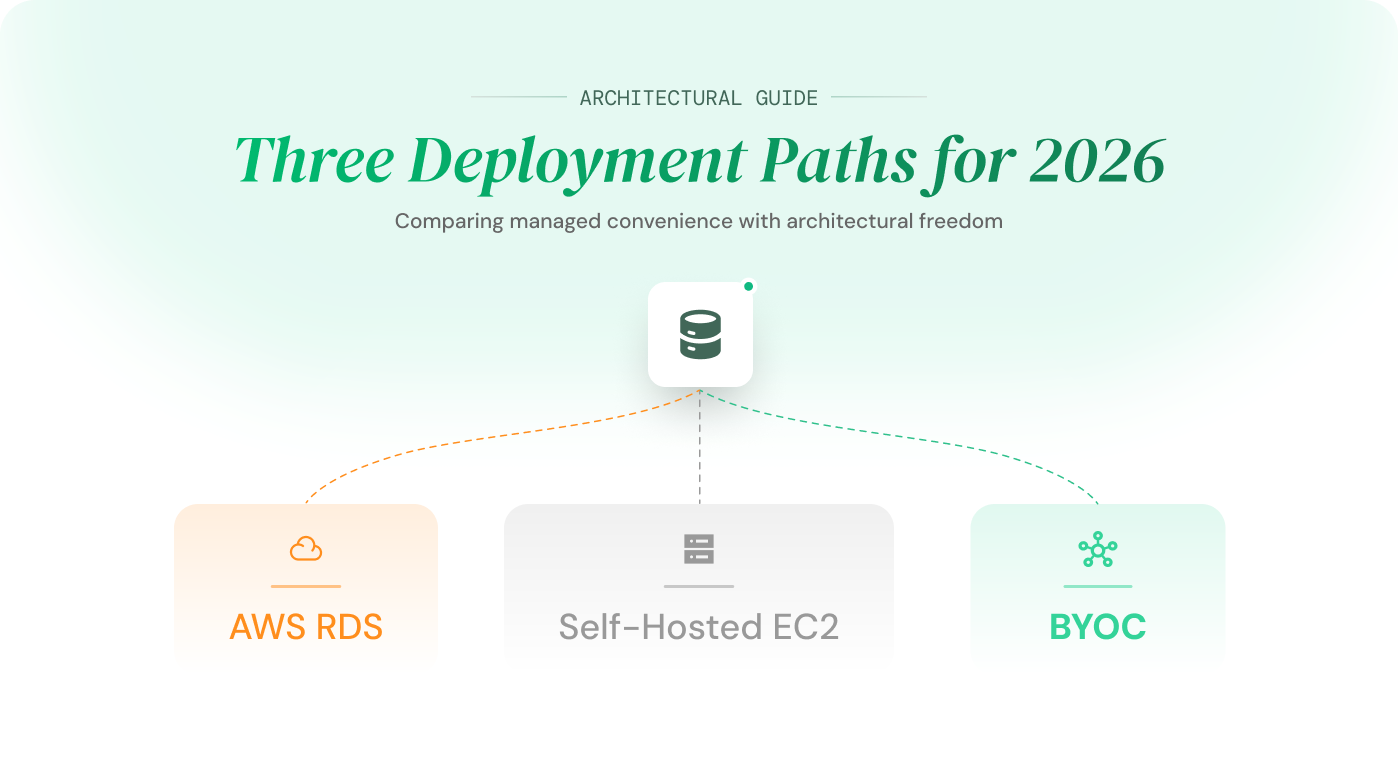
This article compares three models for running PostgreSQL in 2026: AWS RDS (fully managed), self-hosted on EC2, and BYOC (Bring Your Own Cloud). Each section includes verified pricing so you can see the real cost difference, not estimates.
Table of Contents
AWS RDS vs Self-Hosted PostgreSQL
If you’re comparing AWS RDS vs self-hosted PostgreSQL, here’s the real cost difference in 2026:
– AWS RDS: ~$744/month (fully managed, Multi-AZ, replica, backups)
– Self-hosted on EC2: ~$332/month infrastructure (~$832+ with engineering time)
– BYOC (Bring Your Own Cloud): ~$300–$400/month with managed operations
Self-hosted PostgreSQL looks cheaper on paper, but often becomes more expensive than RDS once operational effort is included. BYOC offers the lowest total cost with managed reliability.
Why Teams Are Moving From AWS RDS to Self-Hosted PostgreSQL
AWS RDS is the default choice for teams that want a managed PostgreSQL database without thinking about infrastructure. AWS handles provisioning, automated backups, patching, and failover. For an early-stage product, that trade-off makes sense. You pay more per dollar of compute, but your engineers spend zero time on database operations.
The shift in thinking happens when the product matures and the architecture grows to match.
Here is what typically changes:
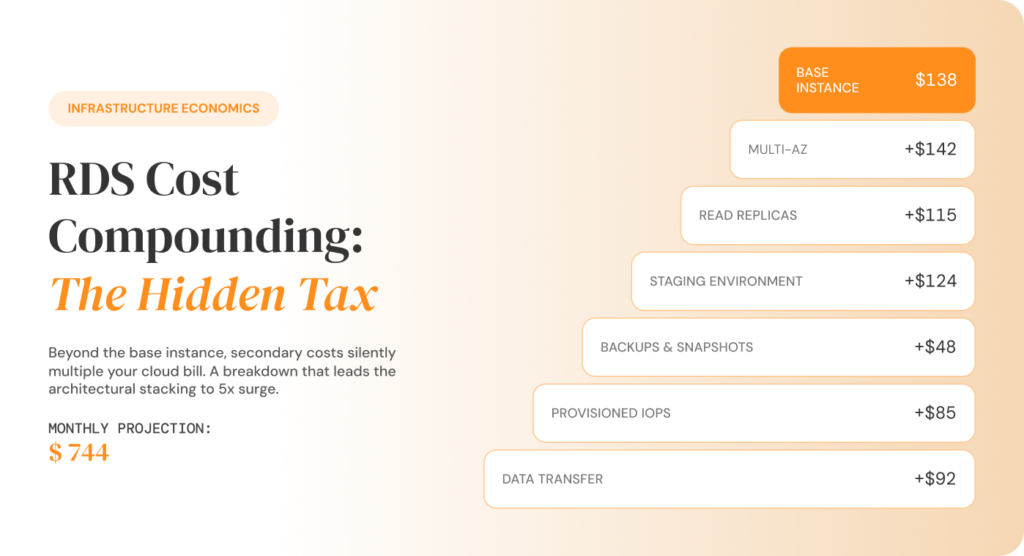
- Multi-AZ gets enabled for production reliability. This alone doubles your compute cost because AWS bills the standby instance at the same rate as the primary.
- A read replica gets added for query performance. That is another full-price instance.
- A staging environment is created to mirror production. Another instance, another storage volume.
- Backup retention increases from 7 days to 35 days as compliance requirements tighten. Storage charges grow accordingly.
- IOPS requirements increase as write-heavy workloads scale. Provisioned IOPS on io1 are billed separately at $0.10 per IOPS per month.
None of these changes are wasteful. Every one of them exists because the product genuinely needs it. But each is a separate billing layer, and together they explain why a PostgreSQL database that cost $138/month at launch quietly becomes $744/month without a single line of application code changing.
This is documented in detail in Why AWS RDS Is Expensive Once Your Product Starts Growing, which walks through each cost layer with verified 2026 AWS pricing.
When teams reach this point, the question is no longer “How do I optimise this RDS bill?” The optimisation ceiling is real: if your system genuinely requires Multi-AZ, a read replica, a staging environment, and reliable backups, those are structural costs. No amount of right-sizing or reserved instance purchasing will make them disappear.
The real question becomes: is the managed service model still the right model for where my product is today?
If your RDS bill is already crossing $500/month, this is typically the point where that question becomes financially significant.
At this stage, many teams also start comparing alternatives directly such as:
SelfHost vs AWS RDS (full comparison)
That question is what drives the AWS RDS vs self-hosted PostgreSQL comparison. But as you will see in the next section, managed and self-hosted are not the only two options available in 2026.
Three Ways to Run PostgreSQL in 2026: RDS vs EC2 vs BYOC
Every guide comparing RDS vs EC2 for PostgreSQL presents two options: pay AWS to manage it, or manage it yourself. That framing made sense five years ago. It doesn’t in 2026.
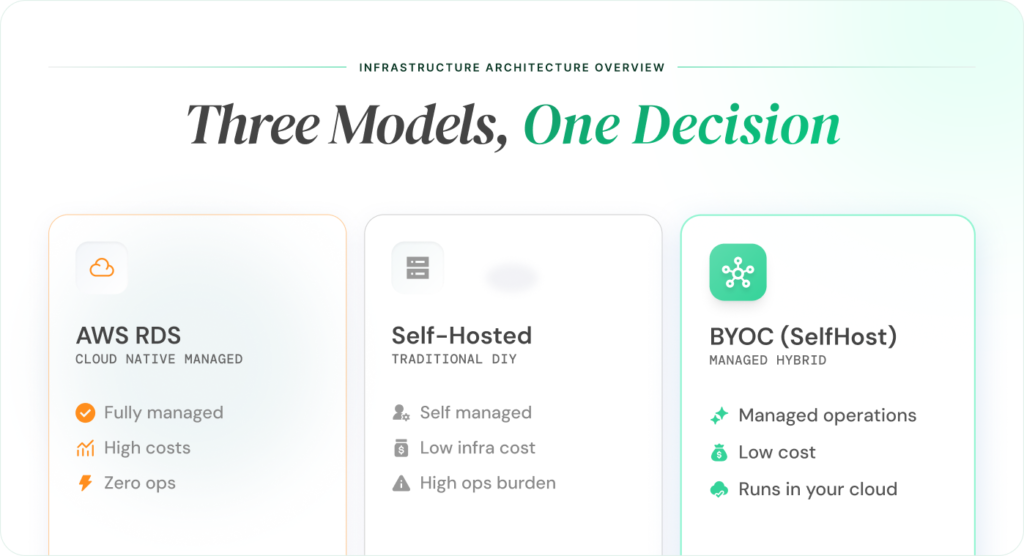
There are now three distinct models for running PostgreSQL in production. Each has a different cost structure, a different operational profile, and a different set of trade-offs.
Managed: AWS RDS
AWS provisions and operates your PostgreSQL database. You select an instance size, choose a storage type, and AWS handles patching, backups, replication, monitoring, and failover.
The convenience is real. So is the markup. You are paying a managed service premium on every component, compute, storage, IOPS, backups, and data transfer, all billed independently. As your architecture adds Multi-AZ, read replicas, and staging environments, those premiums compound across every layer.
RDS is the right model when your database bill is small and your team’s time is more valuable than the cost difference. It stops being the right model when the bill grows and the premium scales with it.
Self-Hosted: PostgreSQL on EC2
You install and run PostgreSQL directly on EC2 instances. You pay raw AWS compute and storage rates, no managed service layer on top.
Infrastructure costs drop 40–60% compared to RDS for the same workload. But the AWS bill is only part of the cost. You now own every operational responsibility:
- High availability: Patroni or similar for automated failover
- Backups: pgBackRest with S3 integration, compression, encryption
- Monitoring: Prometheus, Grafana, alerting rules, on-call rotation
- Upgrades: PostgreSQL minor and major version patching
- Security: OS hardening, network configuration, access controls
For teams with a dedicated infrastructure engineer or DBA, this trade-off can work. For teams without one, self-hosting shifts the cost from the AWS bill to engineering time, which is often more expensive.
BYOC: Bring Your Own Cloud
Your PostgreSQL database runs inside your own cloud account, your AWS, your GCP, your Azure. You pay the cloud provider directly at standard compute and storage rates, the same rates as self-hosted. No managed service markup sits on top.
A platform handles the operational layer: provisioning, failover, backups, monitoring, upgrades, and scaling. Platforms like SelfHost handle this operational layer while your database continues to run inside your own cloud account. You get the cost structure of self-hosted with the operational simplicity of managed.
To see how these trade-offs play out in real-world platforms, explore these direct comparisons:
These comparisons break down cost, control, and operational complexity across different database platforms.
Platforms like SelfHost handle the operational layer while your database continues to run inside your own cloud account, giving you the cost structure of self-hosted with the simplicity of managed services.
To understand how this model works in detail, see:
What Is BYOC? A Smarter Alternative to Expensive Managed Databases
The key difference from RDS: you are not paying a premium on every GB and every instance hour.
The key difference from self-hosted: you are not staffing a team to keep the database running.
RDS vs EC2 Database Cost: The Same Workload, Three Price Tags
Comparisons without numbers are opinions. This section prices the exact same PostgreSQL workload across all three models using verified 2026 AWS pricing for us-east-1 (N. Virginia), cross-referenced against the AWS official RDS pricing page and Vantage EC2 Instances.
The workload: a production-grade PostgreSQL setup on db.m6g.large (2 vCPU, 8 GB RAM) with high availability, one read replica, a staging environment, and 500 GB of gp3 storage. This is the same configuration used in Why AWS RDS Is Expensive Once Your Product Starts Growing so you can compare directly.
How Much Does AWS RDS Cost Per Month? (Real Breakdown)
| Component | Detail | Est. Monthly Cost |
|---|---|---|
| Production (Multi-AZ) | db.m6g.large, $0.318/hr on-demand | ~$232 |
| Read replica | db.m6g.large, $0.159/hr | ~$116 |
| Staging (Single-AZ) | db.m6g.large, $0.159/hr | ~$116 |
| Storage (gp3) | 500 GB prod + 200 GB staging, $0.115/GB-month | ~$80 |
| Backup storage | 35-day retention, $0.095/GB-month beyond free tier | ~$45 |
| Provisioned IOPS | io1, 1,000 IOPS at $0.10/IOPS-month | ~$100 |
| Data transfer | Cross-AZ sync, replica traffic, outbound | ~$55 |
| Total | ~$744/month |
AWS RDS costs approximately ~$744/month for this production PostgreSQL setup, with compute, storage, backups, IOPS, and data transfer all billed separately.
Every line item here is documented on the AWS RDS pricing page. Nothing is inflated. This is what a standard growth-stage PostgreSQL deployment costs on RDS at on-demand rates.
How Much Does It Cost to Run PostgreSQL on EC2? (~$332/month)
| Component | Detail | Est. Monthly Cost |
|---|---|---|
| Production HA (2× m6g.large) | $0.0808/hr each, Patroni cluster | ~$116 |
| Read replica (m6g.large) | $0.0808/hr | ~$58 |
| Staging (m6g.large) | $0.0808/hr | ~$58 |
| Storage (gp3) | 700 GB total across environments, $0.08/GB | ~$56 |
| Backup storage | pgBackRest to S3 (~600 GB at standard rates) | ~$14 |
| Data transfer | Cross-AZ replication, outbound | ~$30 |
| Infrastructure total | ~$332/month |
Running PostgreSQL on EC2 costs approximately ~$332/month for infrastructure alone, making it significantly cheaper than RDS but this excludes engineering time, maintenance, and operational overhead.
EC2 pricing sourced from AWS EC2 On-Demand pricing for m6g.large in us-east-1. The raw infrastructure cost is 55% less than RDS for the same compute and storage specs.
But $332 is not the full cost. It is the AWS bill. The engineering cost sits on top of it and that is where most self-hosting comparisons fall apart.
BYOC PostgreSQL Cost Breakdown: Managed Operations at ~$300–$400/month
| Component | Detail | Est. Monthly Cost |
|---|---|---|
| Cloud infrastructure | You pay AWS directly at EC2/EBS rates | ~$332 |
| SelfHost platform | Managed operations: HA, failover, backups, monitoring, upgrades | Varies by plan |
| Total | ~$300–$400/month |
BYOC combines the low infrastructure cost of self-hosting (~$332/month) with fully managed operations, resulting in a total cost of ~$300–$400/month without the operational overhead of running PostgreSQL yourself.
With BYOC, your cloud infrastructure costs are identical to self-hosted because your database runs in your own AWS account at the same EC2 and EBS rates. SelfHost adds a platform fee for the managed operations layer but the combined total still comes in at roughly 50–60% less than RDS.
This is where SelfHost positions itself, giving you the cost structure of self-hosted infrastructure without the operational burden.
No managed service markup on compute. No managed service markup on storage. No surprise egress fees when you want to move your data, because the data already lives in your account.
For teams evaluating this trade-off at a broader level, Managed vs Self-Hosted Database: Which Is Better for Your Startup? covers the full decision framework beyond just cost.
AWS RDS vs EC2 vs BYOC: Cost and Trade-Off Comparison (2026)
| Component | AWS RDS | Self-Hosted (EC2) | BYOC (SelfHost) |
|---|---|---|---|
| Monthly infrastructure cost | ~$744 | ~$332 | ~$332 |
| Managed operations included | Yes | No | Yes |
| Engineering time required | None | 5–9 hrs/month | None |
| Full config control | Limited | Full | Full |
| Vendor lock-in | High (AWS) | Medium (AWS infra) | Low (your account) |
| Data ownership | AWS manages | You own | You own |
| Effective total cost | ~$744 | ~$832+ (infra + eng. time) | ~$300–$400 |
BYOC offers the lowest total cost (~$300–$400/month) by combining self-hosted infrastructure pricing with fully managed operations, while RDS is the most expensive (~$744/month) and self-hosted EC2 becomes the most costly in practice once engineering time is included (~$832+).
Here’s what the actual total cost looks like when engineering time is included:

While self-hosted PostgreSQL appears cheaper on infrastructure, it becomes the most expensive option once operational effort is included.
What the EC2 Self-Hosting Price Doesn’t Include
The $332/month self-hosted figure from the table above is real. But it only covers what AWS charges you. It does not cover what your team spends to keep that database running reliably.
This is where most AWS RDS vs self-hosted PostgreSQL comparisons break down. They compare the infrastructure bill and stop there. The operational cost, the engineering hours required to build, maintain, and troubleshoot the self-hosted stack, never makes it into the spreadsheet.

Here is what it actually takes.
Self-Hosted PostgreSQL Setup Cost: Initial Time Breakdown (20–40 Hours)
| Task | Estimated Hours |
|---|---|
| Patroni cluster configuration for automated failover | 8–16 |
| pgBackRest setup with S3 integration, compression, and encryption | 4–8 |
| Prometheus + Grafana monitoring and dashboards | 4–8 |
| Alerting rules, on-call routing, incident runbooks | 2–4 |
| Network security: VPC, security groups, firewall rules | 2–4 |
| Total initial setup | 20–40 hours |
Setting up a production-ready PostgreSQL cluster on EC2 typically requires 20–40 hours of engineering time, covering failover, backups, monitoring, and security, none of which are included in the infrastructure cost.
These are not optional tasks. Without Patroni, your database has no automated failover. Without pgBackRest, your backups are manual and untested. Without monitoring, you find out about problems when your users do.
Each of these tools is well-documented and open source – Patroni, pgBackRest, Prometheus but configuring them for production requires real expertise and real time.
How Much Time Does Self-Hosted PostgreSQL Maintenance Take? (Monthly Breakdown)
| Task | Estimated Hours / Month |
|---|---|
| PostgreSQL minor version upgrades and security patching | 1–2 |
| Backup verification and restore testing | 1–2 |
| Monitoring review, alert tuning, and incident response | 1–2 |
| Failover testing and high availability validation | 1 |
| Storage and performance review | 1 |
| Total monthly maintenance | 5–9 hours |
Self-hosted PostgreSQL typically requires 5–9 hours per month for maintenance, including updates, backups, monitoring, and failover testing.
Some voices in the self-hosting community claim maintenance takes 30 minutes a month. For a single low-traffic database with no compliance requirements, perhaps. For a production system serving paying customers, one that needs tested backups, verified failover, security patches, and performance monitoring, 30 minutes is not a realistic number.
What Is the Real Cost of Self-Hosted PostgreSQL? (Including Engineering Time)
| Cost Type | Monthly Cost |
|---|---|
| AWS infrastructure | ~$332 |
| Engineering time (5–9 hrs at $100/hr) | ~$500–$900 |
| Total effective cost | ~$832–$1,232 |
Self-hosted PostgreSQL typically costs ~$832–$1,232 per month when you include engineering time, making it more expensive than it initially appears.
The self-hosted option that looked 55% cheaper than RDS is now 12–65% more expensive once you factor in the people required to run it.
This does not account for the opportunity cost: every hour an engineer spends configuring Patroni or debugging a failed backup is an hour they are not building product. For most growing startups, that is the most expensive line item of all.
BYOC eliminates this entire category of cost. The infrastructure runs at the same EC2/EBS rates. The platform handles operations. Your team ships product.
Is AWS RDS Better Than EC2 for PostgreSQL?
AWS RDS is better than EC2 when:
- Your database cost is under $500/month
- You don’t have a dedicated DevOps or infrastructure engineer
- You want zero operational overhead (backups, failover, patching handled by AWS)
EC2 (self-hosted PostgreSQL) is better when:
- Your database cost exceeds $1,000/month
- You need full control over PostgreSQL configuration
- You have in-house expertise to manage failover, backups, and monitoring
RDS trades higher cost for convenience. EC2 trades lower infrastructure cost for higher operational complexity.
AWS RDS vs EC2 PostgreSQL: Key Differences in Cost, Control, and Maintenance
| Factor | AWS RDS | Self-Hosted (EC2) |
|---|---|---|
| Setup speed | Minutes to launch | Hours to configure |
| Ongoing maintenance | Automated by AWS | Manual — your team |
| Monthly cost (infrastructure) | ~$744 | ~$332 |
| Monthly cost (including ops) | ~$744 | ~$832+ |
| PostgreSQL configuration control | Limited parameters | Full access |
| Extension support | Subset of extensions | Any extension |
| High availability | Built-in Multi-AZ | Requires Patroni setup |
| Vendor lock-in | High | Medium |
AWS RDS offers convenience and managed operations, while self-hosted EC2 provides more control but requires ongoing engineering effort and higher real-world cost.
What Are the Disadvantages of Amazon RDS?
The main disadvantages of Amazon RDS are:
- Cost escalation at scale (Multi-AZ, replicas, backups all add separate charges)
- Vendor lock-in to AWS infrastructure and tooling
- Limited configuration control (no OS access, restricted PostgreSQL tuning)
- Reduced infrastructure visibility compared to self-hosted setups
RDS is easy to start with, but becomes expensive and restrictive as your database grows.
1. Cost Escalation at Scale
AWS RDS pricing increases as your system grows. Features required for production such as Multi-AZ, read replicas, extended backups, and provisioned IOPS, are all billed separately.
What starts as a simple ~$138/month setup can quickly scale to ~$744/month without any change to your application, only your infrastructure requirements.
These costs aren’t optional. They’re the baseline for reliability in production systems.
For a detailed breakdown of how each layer contributes to this increase, see:
Why AWS RDS Gets Expensive as You Scale
If you’re comparing alternatives, this becomes even clearer here:
SelfHost vs AWS RDS: Cost, Control, and Trade-offs
2. Vendor Lock-In
Vendor lock-in extends beyond the database.
Your data, backups, monitoring, alerting, IAM roles, VPC configuration, and operational runbooks are all built around AWS-specific services.
Migrating away is not just a data export, it is a full infrastructure re-architecture.
This is why many teams start evaluating alternatives like:
Managed vs Self-Hosted Database: Which Is Better for Your Startup?
3. Limited Configuration Control
RDS restricts access to the underlying system.
- No SSH access to the instance
- Limited PostgreSQL parameter tuning
- Some extensions unsupported or delayed
Teams that need custom tuning, non-standard extensions, or OS-level control quickly hit these limitations.
4. Limited Infrastructure Visibility
You cannot directly inspect the compute instance running your database.
Debugging performance issues relies on CloudWatch metrics and AWS Support instead of direct system access.
For teams used to full observability, this becomes a significant operational constraint.
5. Reserved Instances Don’t Solve the Core Problem
Reserved Instances can reduce compute costs by 30–40%, but they don’t address the underlying issue with RDS pricing.
Most of the cost in a production setup doesn’t come from compute alone. Storage, IOPS, backups, and data transfer continue to scale independently and are billed at full rates.
This means that even after optimisation, your total database cost keeps increasing as your system grows.
If your RDS bill is still high after using Reserved Instances, the problem is usually not configuration — it’s the pricing model itself.
This is where newer approaches like
What Is BYOC? A Smarter Alternative to Expensive Managed Databases, start becoming relevant.
Key insight:
RDS doesn’t become expensive because of poor configuration, it becomes expensive because its pricing model compounds with scale.
What Is the Cheapest Way to Host PostgreSQL?
The cheapest way to host PostgreSQL depends on how you define cost.
- Bare metal servers (Hetzner, OVHcloud): ~$60–$150/month (lowest infrastructure cost, highest operational effort)
- Self-hosted on EC2: ~$332/month infrastructure (~$832+ when engineering time is included)
- AWS RDS: ~$744/month with fully managed operations
- BYOC (Bring Your Own Cloud): ~$300–$400/month with managed operations included
Bare metal is cheapest for infrastructure. BYOC is cheapest for total cost when operational effort is included.
The cheapest way to host PostgreSQL is self-hosting on bare-metal servers from providers like Hetzner or OVHcloud. A dedicated server with 32 cores and 128 GB RAM starts under $100/month, a fraction of what equivalent specs cost on any cloud provider.
But cheapest infrastructure is not the same as cheapest total cost.
PostgreSQL Hosting Cost Comparison: RDS vs EC2 vs BYOC vs Bare Metal (2026)
| Hosting Model | Infrastructure Cost | Ops Overhead | Effective Total Cost | Best For |
|---|---|---|---|---|
| Bare metal (Hetzner, etc.) | ~$60–$150/month | High — you manage everything | ~$560–$1,050+ | Teams with deep infra expertise and cost as top priority |
| Self-hosted on EC2 | ~$332/month | High — manage Patroni, backups, monitoring | ~$832–$1,232 | Teams with DevOps capacity on AWS |
| BYOC (SelfHost) | ~$300–$400/month | None — platform handles operations | ~$300–$400 | Teams that want low cost without ops burden |
| AWS RDS | ~$744/month | None — AWS handles operations | ~$744 | Teams that prioritise simplicity |
BYOC offers the lowest total cost (~$300–$400/month) with managed operations, while self-hosted setups become the most expensive (~$832+) once engineering time is included.
Key Insight
The cheapest infrastructure is not the cheapest in practice. Once operational effort is included, self-hosted setups often become more expensive than managed alternatives.
Bare metal offers the lowest raw compute cost, but requires deep expertise across hardware, networking, OS management, and PostgreSQL operations. For most teams, the real decision isn’t bare metal vs cloud , it’s AWS RDS vs self-hosted vs BYOC.
For a deeper breakdown, see:
Why AWS RDS Is Expensive Once Your Product Starts Growing
Managed vs Self-Hosted Database: Which Is Better for Your Startup?
BYOC shifts this trade-off. Your database runs in your own cloud account at standard infrastructure rates, while the platform handles operations like high availability, backups, monitoring, and upgrades.
What Is BYOC? A Smarter Alternative to Expensive Managed Databases
In practice, self-hosted EC2 is often the most expensive option, not because of infrastructure costs, but because of the ongoing engineering effort required to run it reliably.
That hidden operational cost is what turns the “cheapest” option on paper into the most expensive one for most teams.
When to Choose RDS, Self-Hosted, or BYOC: A Decision Framework

There is no universally correct answer to the AWS RDS vs self-hosted PostgreSQL question. The right model depends on your team size, database spend, operational capacity, and where your product is headed.
This framework maps common situations to the model that fits best:
Which PostgreSQL Hosting Model Should You Choose? (RDS vs EC2 vs BYOC Decision Guide)
| Your Situation | AWS RDS | Self-Hosted (EC2) | BYOC (SelfHost) |
|---|---|---|---|
| Database spend under $500/month | Best choice | Overkill | Overkill |
| $500–$1,000/month, no infra team | Good fit | Risky | Best choice |
| Over $1,000/month with DevOps team | Overpaying | Good fit | Good fit |
| Over $1,000/month without DevOps | Overpaying | Risky | Best choice |
| Need full PostgreSQL config control | Limited | Best choice | Good fit |
| Multi-cloud or data sovereignty required | Poor fit | Good fit | Best choice |
| Want to avoid vendor lock-in | Poor fit | Good fit | Best choice |
| Prioritise fastest time to launch | Best choice | Slowest | Good fit |
BYOC is the best choice for most growing teams, offering low cost with managed operations, while RDS suits smaller setups and self-hosting requires significant engineering effort.
Should I Self-Host PostgreSQL?
Self-host if all three of the following are true:
- Your database infrastructure spend exceeds $1,000/month: below this threshold, the engineering time to manage a self-hosted setup typically costs more than the savings.
- You have at least one engineer with production PostgreSQL and Linux experience: not someone who can learn it, someone who has done it. Failover configuration, backup recovery testing, and security patching under pressure require hands-on experience.
- You are willing to own the on-call responsibility: when the database goes down at 2 AM, there is no AWS Support to escalate to. Your team is the last line of defence.
If any of those three conditions is missing, self-hosting introduces more risk than it removes cost.
BYOC gives you the cost benefit of self-hosting without requiring your team to meet those conditions.
The Pattern Most Growing Teams Follow
Early stage → RDS. The managed premium is worth it. Ship product, not infrastructure.
Growth stage → BYOC. The bill has grown, the team has not added a DBA, and the savings from moving off RDS are meaningful without taking on operational risk.
Scale stage → Self-hosted or BYOC. The team now has dedicated infrastructure engineers. Self-hosting becomes viable. BYOC remains competitive because even experienced teams would rather spend engineering time on product, not database maintenance.
This progression is not hypothetical. It mirrors how the managed vs self-hosted database trade-off plays out across hundreds of growing startups evaluating their database strategy.
Key Takeaways

- AWS RDS costs ~$744/month for a production PostgreSQL workload (Multi-AZ, read replica, staging) that costs ~$332/month on EC2. The managed service premium is real and it compounds with every reliability feature you enable.
- Self-hosting on EC2 is not actually cheaper once you include engineering time. At 5–9 hours/month of maintenance at $100/hour, the effective cost (~$832–$1,232) often exceeds RDS.
- BYOC is the model most comparisons miss. Your database runs in your own cloud account at standard compute rates. A platform handles operations. Total cost: ~$300–$400/month for the same workload — 50–60% less than RDS, with zero ops overhead.
- RDS is the right choice early on. If your database bill is under $500/month and you have no infra team, the managed premium is worth paying.
- The decision is not binary. “Managed vs self-hosted” is an outdated frame. In 2026, the real question is: who handles operations, and how much do you pay for infrastructure? BYOC answers both differently than RDS or EC2.
AWS RDS vs Self-Hosted PostgreSQL: Key Differences
Here’s a quick comparison of AWS RDS vs self-hosted PostgreSQL:
- Cost: RDS is more expensive; self-hosted is cheaper on infrastructure but higher with ops
- Operations: RDS is fully managed; self-hosted requires manual setup and maintenance
- Control: Self-hosted gives full control; RDS has restrictions
- Scalability: Both scale well, but RDS charges a premium for it
RDS is easier. Self-hosted is cheaper on paper. BYOC combines both advantages.FAQ: AWS RDS vs Self-Hosted PostgreSQL
If you’re currently using AWS RDS and evaluating alternatives, the easiest next step is to compare models directly:
What Is BYOC? A Smarter Alternative to Expensive Managed Databases
This gives you a clear picture of cost, control, and operational trade-offs before making a decision.
Frequently asked questions
How much does Amazon RDS cost per month?
It depends on your configuration. A single db.t4g.micro for development costs roughly $12/month. A production setup with Multi-AZ, a read replica, staging environment, and 500 GB of gp3 storage costs approximately $744/month at on-demand rates in us-east-1. For a line-by-line breakdown with verified 2026 pricing, see Why AWS RDS Is Expensive Once Your Product Starts Growing.
Is AWS RDS hosted on EC2?
Yes. RDS instances run on EC2 infrastructure under the hood. AWS manages the instance, operating system, and database engine on your behalf. You do not have SSH access or control over the underlying compute. The managed service premium you pay covers that operational layer.
Should I self-host PostgreSQL?
Self-host only if your database spend exceeds $1,000/month, you have at least one engineer with production PostgreSQL and Linux experience, and your team is prepared to own the on-call responsibility. If any of those conditions is missing, self-hosting introduces more risk than it removes cost.
What are the risks of Amazon RDS?
The primary risks are cost escalation and vendor lock-in. RDS costs compound as your architecture matures because every component is billed independently. Migrating away from RDS requires re-architecting operational tooling, not just exporting data. Extended Support charges for end-of-life PostgreSQL versions can also increase costs significantly — up to $0.20 per vCPU-hour in Year 3.
Why use RDS instead of EC2 for PostgreSQL?
RDS eliminates operational overhead. AWS handles provisioning, patching, backups, monitoring, and failover automatically. For teams without a dedicated database administrator, this convenience is worth the 20–30% managed service premium over raw EC2 costs. The trade-off becomes less favourable as the database bill grows and the premium compounds across multiple instances.
How expensive is AWS RDS compared to self-hosted PostgreSQL?
For the production workload compared in this article, RDS costs ~$744/month. The same workload self-hosted on EC2 costs ~$332/month in infrastructure, but ~$832–$1,232/month when engineering time is included. BYOC costs ~$300–$400/month total with managed operations included. RDS is the most expensive option at scale; self-hosted is often the most expensive when total cost of ownership is calculated honestly.
Is PostgreSQL hosting free?
PostgreSQL itself is free and open source. Hosting it is not. Self-hosting on your own hardware or a bare-metal server (Hetzner, OVHcloud) costs as little as $60–$150/month for infrastructure, but you pay in engineering time for setup and maintenance. Managed services like AWS RDS start at ~$12/month for a micro instance but scale to $744+/month for production workloads. BYOC platforms offer a middle ground, cloud-native rates with managed operations starting at ~$300/month for production setups.
How to reduce AWS RDS costs?
Four steps, in order of impact: First, right-size your instances, check CloudWatch CPU and memory metrics over 30 days and drop one size if utilisation is consistently below 20%. Second, switch from gp2 to gp3 storage for the same price with better baseline IOPS. Third, audit manual snapshots, they accumulate silently and never expire. Fourth, purchase Reserved Instances for stable workloads to save 30–40% on compute. If you have done all four and the bill is still too high, the issue is the pricing model itself, not your configuration. That is when teams evaluate BYOC as an alternative.
How to reduce database cost?
The biggest database cost reduction comes from choosing the right hosting model, not optimising within the wrong one. Right-sizing instances and storage types can save 10–20%. Reserved Instances save 30–40% on compute. But if your architecture requires Multi-AZ, read replicas, and staging environments, those are structural costs that no optimisation can remove. Moving from a managed service like RDS to a BYOC model can reduce total database costs by 50–60% because you eliminate the managed service premium while keeping managed operations.
Why is Postgres so expensive?
PostgreSQL itself is free. What is expensive is the infrastructure and operations required to run it reliably in production. A production PostgreSQL deployment needs high availability (failover), automated backups, monitoring, security patching, and performance tuning. On AWS RDS, you pay AWS a premium on every component for handling this. Self-hosted, you pay engineers to handle it. The cost is never zero, the question is whether you pay it in cloud bills or engineering hours. BYOC reduces both by removing the managed service markup and the operational overhead simultaneously.
How to migrate postgres db from one server to another?
Standard PostgreSQL migrations use pg_dump and pg_restore for offline migrations, or logical replication for minimal-downtime cutovers. For moving from RDS to EC2 or BYOC, export your database using pg_dump –format=custom, transfer the file to your target server, and restore with pg_restore. For larger databases where downtime is a concern, set up logical replication from your RDS instance to the target, let it sync, then cut over. AWS Database Migration Service can also handle the transfer but adds its own per-hour charges. Most migrations from RDS to another PostgreSQL host require no application code changes, only the connection string updates.
Does RDS support PostgreSQL?
Yes. AWS RDS fully supports PostgreSQL as one of its seven database engines. RDS PostgreSQL handles provisioning, automated backups, patching, and Multi-AZ failover. However, RDS restricts access to the underlying operating system, limits certain PostgreSQL configuration parameters, and does not support all extensions available in standard PostgreSQL. If you need full extension support or custom OS-level configuration, self-hosted or BYOC deployments provide unrestricted PostgreSQL access.
Final thoughts
Teams that move to SelfHost’s BYOC model typically reduce their database infrastructure costs by up to 60% without removing a single reliability feature. Your database runs inside your own cloud account with full visibility and control, while SelfHost handles the operational layer.
If you are spending $500/month or more on AWS RDS and watching that number climb, it is worth comparing what the same workload looks like on SelfHost, the difference is often 50–60%.
SelfHost also offers a PostgreSQL MCP Server, meaning your AI coding agent such as Claude, Cursor, Windsurf, or VS Code, can query, inspect, and monitor your database directly without leaving your IDE.This makes it possible to manage and interact with your database directly from your development workflow without additional tooling.