

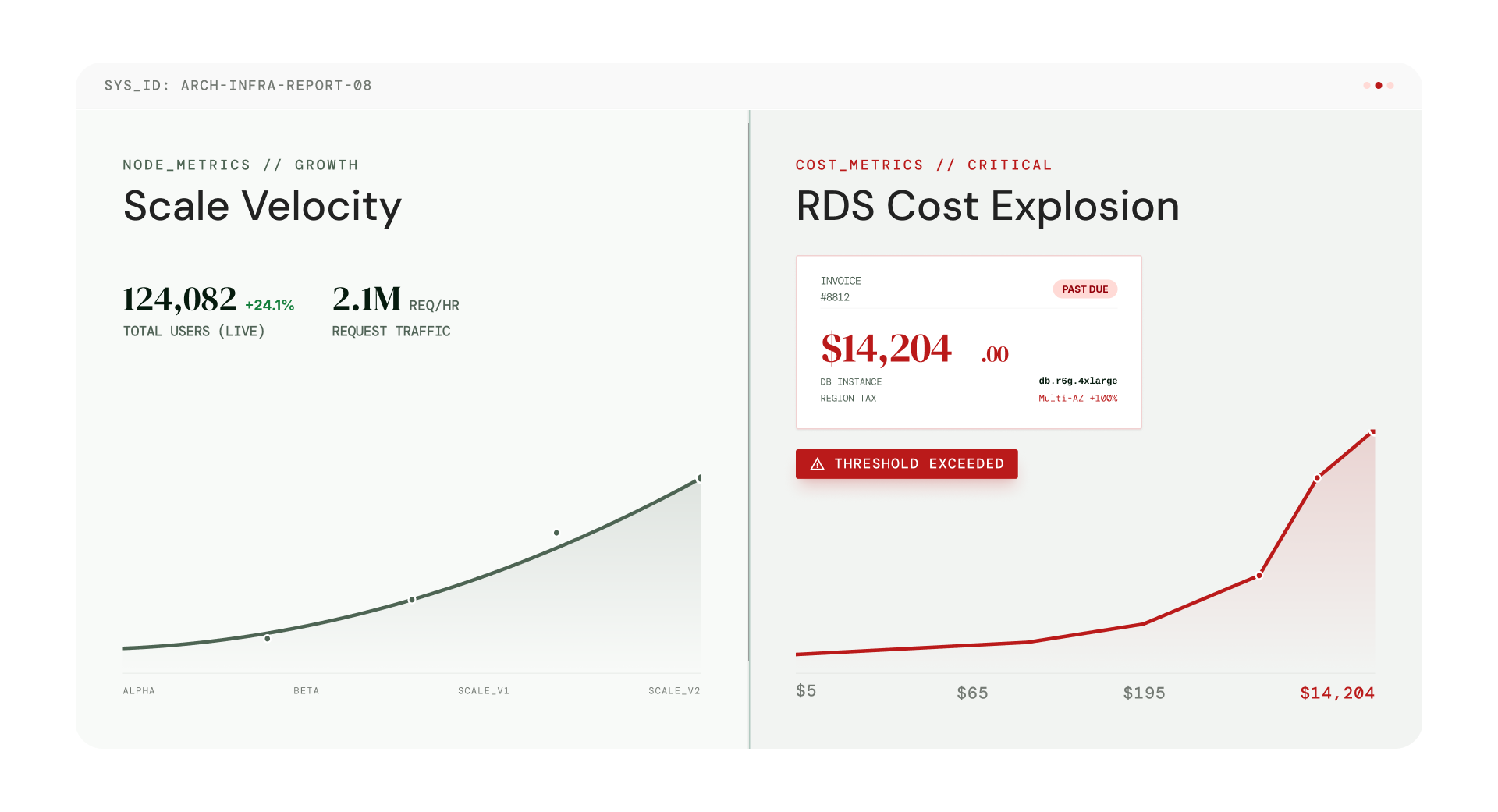
If you’ve ever opened your cloud bill and paused a little longer than usual, you’re not alone. At some point in every growing product’s journey, teams start asking the same quiet question: why is RDS so expensive, especially when it didn’t feel that way at the start.
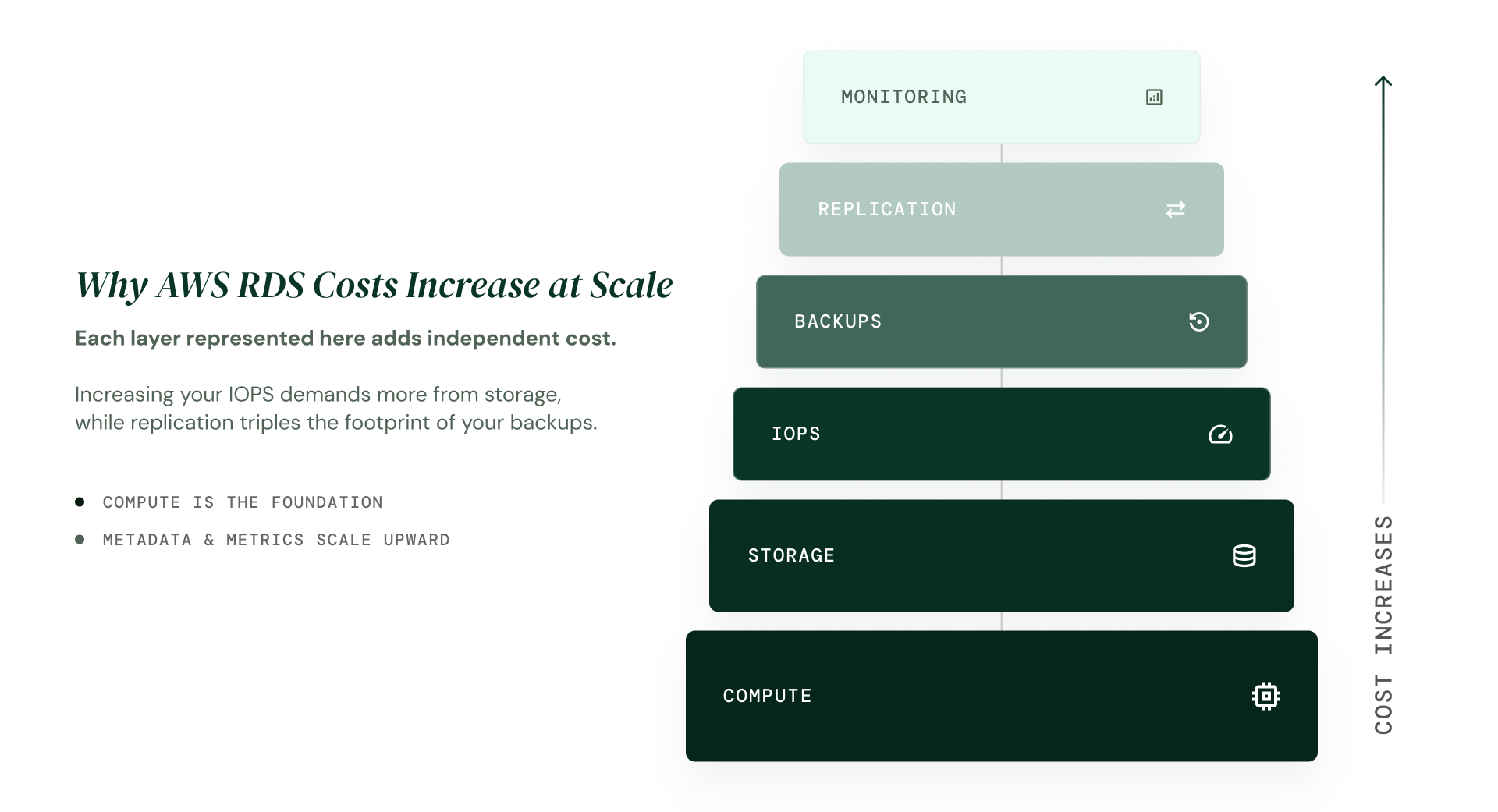
The direct answer is that AWS RDS is expensive because you’re not paying for just a database. You’re paying for a stack of components such as compute, storage, replication, backups, and high availability which are all billed independently.
As your architecture matures, those layers compound rather than grow linearly. That’s why AWS RDS becomes expensive faster than most teams expect.
Flexera’s 2026 State of the Cloud Report surveyed 753 cloud decision-makers worldwide. The results showed that 29% of cloud spend is currently wasted, and managing cloud costs remains the number one challenge for 85% of organisations. RDS over-provisioning is one of the most consistent contributors to that figure.
Despite this, RDS is popular for a good reason. It’s simple to launch, easy to manage, and removes real operational burden from small teams. In the early stages, that convenience is a genuinely smart trade-off.
This is exactly why many teams eventually start exploring how growing startups evaluate managed vs self-hosted database trade-offs.
This article is not about criticising AWS. It’s about explaining, with verified 2026 pricing data, exactly why AWS RDS is expensive as your product scales and what your options actually are when you reach that point.
Why AWS RDS Is Expensive: How the Pricing Model Actually Works
Understanding why AWS RDS is expensive starts with one key insight: you are never paying for a single thing. You are paying for a stack of services, each billed on its own meter.
Here is what that stack looks like in practice:
- Instance hours - compute (CPU and RAM) billed per second
- Storage - gp2, gp3, or io1, charged per GB per month
- Automated backup storage - free up to 100% of database size, billed beyond that
- Provisioned IOPS - charged separately from storage on io1
- Multi-AZ standby - a full second instance billed at the same rate
- Read replicas - each one is an independent full-price instance
- Manual snapshots - persist indefinitely, accumulate silently
- Data transfer - cross-AZ replication, outbound traffic
Key principle:
Each component is billed independently. Individually they feel small. Together, they explain why AWS RDS is expensive at scale.
AWS documents this on its official pricing page. The components are listed clearly.
What the pricing page doesn’t show is how they stack on top of each other and why RDS is expensive specifically when multiple layers are active at the same time.
The Growth Inflection Point That Makes AWS RDS Expensive
Most teams don’t ask why RDS is expensive in the early stage. The costs feel reasonable, and the convenience is real.
The question surfaces when:
- The product stabilises and retains paying customers
- Downtime becomes financially and reputationally costly
- Customer expectations around uptime and performance increase
- Compliance or data residency requirements enter the picture
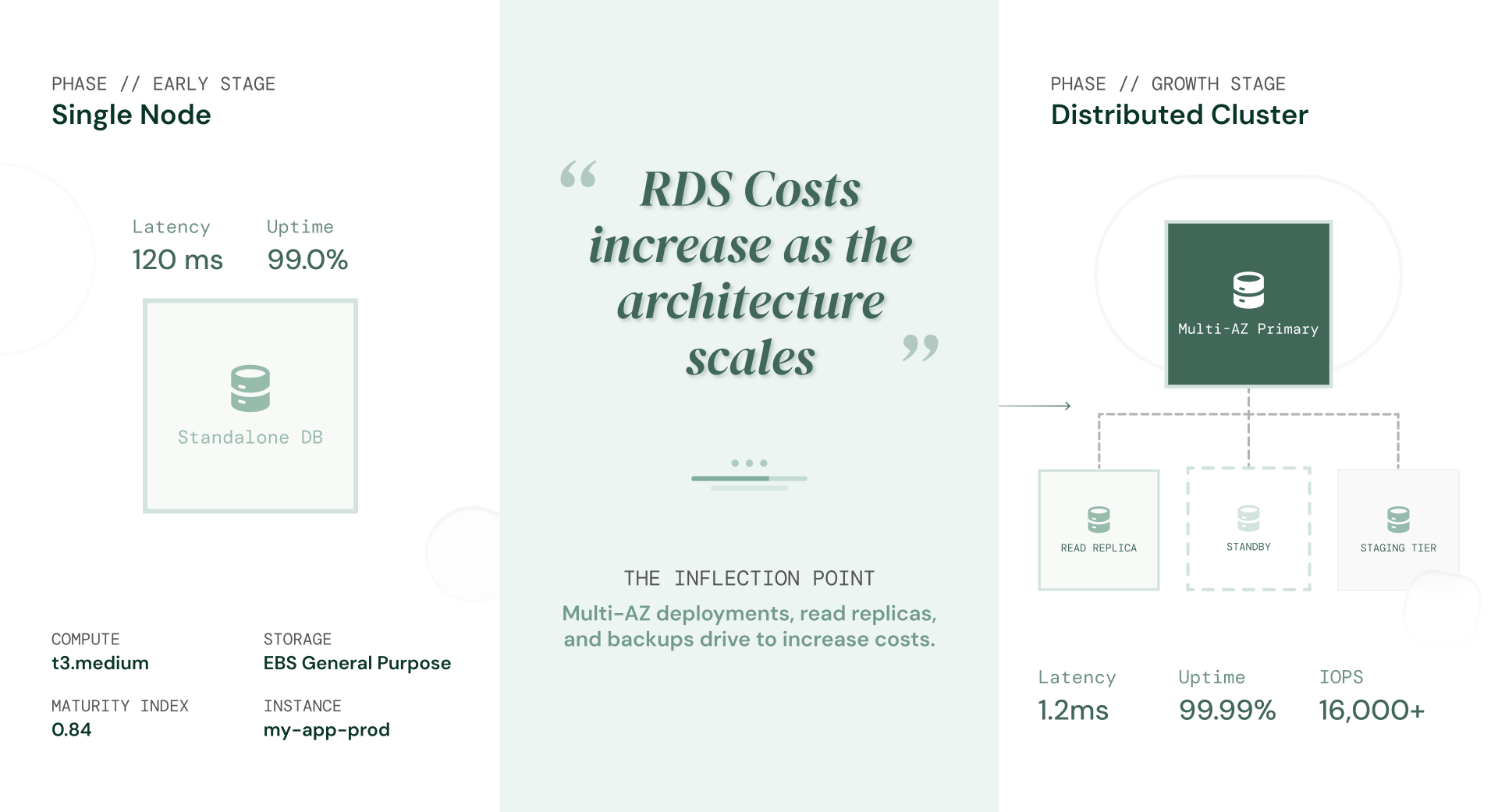
That’s the real inflection point where teams first understand why RDS is expensive and it’s not driven by traffic alone, it’s driven by architecture maturity.
What actually changes at the growth stage
The shift isn’t just more users. It’s the architecture decisions those users demand:
- Multi-AZ enabled for production reliability
- One or more read replicas for query performance
- A staging environment that mirrors production
- Longer backup retention windows (7 to 35 days)
- Higher IOPS as write-heavy workloads grow
Each of these is a separate billing layer and this compounding is precisely why RDS is expensive at the growth stage. Combined, they can turn a $150/month database into a $700–$900/month database without a single change to your application code.
The insight: AWS RDS is not expensive at the beginning. It becomes expensive when reliability becomes non-negotiable and your architecture starts to reflect that.
This is the moment teams start asking whether managed databases are still the right model for their stage.
What AWS RDS Actually Costs at Scale: Verified 2026 Pricing
To show exactly why AWS RDS is expensive in practice, the following tables use verified AWS on-demand pricing for us-east-1 (N. Virginia) as of March 2026, for a PostgreSQL workload on db.m6g.large. All figures are cross-referenced against Vantage EC2 Instances and AWS official pricing documentation.
Early stage: Single AZ, light workload
| Component | Detail | Est. monthly cost |
| db.m6g.large (Single-AZ) | $0.159/hr on-demand · 2 vCPU, 8 GB RAM | ~$116 |
| Storage — gp3, 100 GB | $0.115/GB-month · 3,000 IOPS baseline included free | ~$12 |
| Backup storage (7-day retention) | First 100 GB free (= 100% of DB size) | ~$0 |
| Data transfer (moderate) | Cross-AZ + outbound, light traffic | ~$10 |
| TOTAL — early stage | Single environment, no HA, no replica | ~$138/month |
Pricing based on AWS on-demand rates, us-east-1 (N. Virginia), March 2026. You can Verify current rates on official Amazon RDS pricing page.
Growth stage: Multi-AZ, read replica, staging environment
| Component | Detail | Est. monthly cost |
| db.m6g.large production (Multi-AZ) | $0.318/hr · standby billed as full instance | ~$232 |
| Read replica (db.m6g.large) | $0.159/hr · fully independent instance, separate AZ | ~$116 |
| Staging (db.m6g.large, Single-AZ) | $0.159/hr · mirrors production spec | ~$116 |
| Storage (gp3, 500 GB prod + 200 GB staging) | $0.115/GB-month across both environments | ~$80 |
| Backup storage (35-day retention) | $0.095/GB-month beyond the free-tier ceiling | ~$45 |
| Provisioned IOPS: io1, 1,000 IOPS (if used) | $0.125/GB-month storage + $0.10/IOPS-month | ~$100 |
| Data transfer (cross-AZ sync, replica, outbound) | Scales with traffic and replica lag volume | ~$55 |
| TOTAL (growth stage) | Production-grade: HA + replica + staging | ~$744/month |
Pricing based on AWS on-demand rates, us-east-1 (N. Virginia), March 2026. Figures will vary by region, instance generation, and storage type. Verify current rates on the official Amazon RDS pricing page.
These figures are illustrative for a db.m6g.large workload in us-east-1.
To model your specific instance type, storage type, region, and backup retention, use the AWS Pricing Calculator.
Note: The io1 / Provisioned IOPS row only applies if your workload requires guaranteed IOPS beyond what gp3 provides. Most teams running standard workloads on gp3 will not see this charge. If you are on Reserved Instances, compute costs reduce by 30–40% on a 1-year term and up to 60% on a 3-year term but storage, IOPS, backup, and data transfer charges remain unchanged regardless of reservation.
The key point: nothing in this table is accidental or wasteful. Every line item exists because your product genuinely needs it. These are the costs of running a production-grade database and because they are structural, no amount of optimisation will make them disappear. That is the real reason teams start exploring alternatives.
Can You Reduce AWS RDS Cost? Yes, But Here's Where It Stops Helping
One of the most common questions once teams understand why RDS is expensive is whether optimisation can fix it.
Yes, there are real optimisations available and teams should pursue them before drawing conclusions. Here is what actually works, and where the ceiling is.
1. Right-size your instances
Most teams set up their RDS instance at launch, pick a size that feels safe, and never look at it again. According to Cast AI’s 2025 Kubernetes Cost Benchmark Report, the average cloud CPU utilisation across 2,100+ organisations is just 10%. You are very likely paying for compute you are not using.
The fix is simple: open Amazon CloudWatch, check your CPU utilisation and available memory over the past two weeks, and see what your database is actually doing. If your instance is sitting at 20% CPU, dropping one size down handles the same workload at roughly half the compute cost.
Before making any changes, set up CloudWatch alarms on three metrics: DatabaseConnections, CPUUtilization, and FreeableMemory. Measure first. Then resize.
2. Switch from gp2 to gp3 storage
If you are still on gp2 storage, switching to gp3 is the easiest cost win available to you. Same price per GB, but gp3 gives you 3,000 IOPS and 125 MB/s throughput included at no extra charge. AWS lets you migrate in place, no downtime, no risk.
One thing to check first: if your database is larger than 400 GB, IOPS and throughput minimums increase. Run your numbers through the AWS Pricing Calculator before switching to make sure the move still saves you money.
3. Review backup retention and snapshot accumulation
Most teams set their backup retention window once during setup and never revisit it. If you are on a 35-day retention window, ask yourself honestly: has your team ever needed to restore from a 3-week-old backup? For most products, 14 or 21 days covers the real risk window, and the cost difference is meaningful.
Also check your manual snapshots. Automated snapshots expire automatically when you delete them or when the retention window passes. Manual snapshots do not.
They sit there quietly, accumulating cost every single month, and most teams have no idea how many they have. Go into your RDS console right now and audit them: you may be surprised.
4. Use Reserved Instances for stable workloads
Reserved Instances let you commit to a 1 or 3-year term in exchange for a discount roughly around 30–40% on a 1-year term, up to 60% on a 3-year term.
The catch is flexibility: if your instance type or region needs to change, you lose the discount entirely.
The bigger thing to understand is what Reserved Instances actually discount and what they don’t.
They only reduce your compute charge. Storage, IOPS, backups, and data transfer are billed exactly the same whether you are on-demand or reserved. If those are the lines driving your bill, Reserved Instances will not help.
Where optimisation reaches its ceiling
Here is the uncomfortable truth: if your system genuinely needs Multi-AZ, a read replica, a staging environment, and reliable backups, you are not doing anything wrong. You have simply hit the ceiling of what optimisation can do. The costs are not inefficiency. They are the price of the model itself.
At that point, tweaking settings stops being the answer. The real question becomes: is RDS the right model for where your product is today?
For teams at this stage, the real decision comes down to understanding the managed vs self-hosted database trade-offs for growing startups and how each model holds up as your system scales.
What Growing Teams Do When Optimisation Stops Working
You have right-sized the instances. Switched to gp3. Audited the snapshots. And the bill barely moved.
That is not a you problem. That is a model problem.
There are three paths forward from here. Most teams only discover the third one after spending months on the first two.
Option 1: Stay on RDS
For a lot of teams, this is the right call. If your database bill is somewhere between 5–10% of revenue and your team has no one dedicated to infrastructure, the convenience RDS gives you is genuinely worth the price. Managed means no late-night alerts about replication lag. No DBA on call. No one losing a weekend to a failed upgrade.
The only question worth asking is: does the math still work at twice your current scale?
If the answer is yes, stay. If you are not sure – keep reading.
Option 2: Self-host on EC2 or EKS
This is the classic escape route. Drop RDS, run PostgreSQL directly on EC2, and pay raw compute and storage rates with no managed service markup. At scale, that can cut your database infrastructure costs by 40–60%.
The savings are real. So is the cost that doesn’t show up on the bill.
Upgrades, failover, monitoring, backups, replication, all of it becomes your team’s problem. For a team with a dedicated DevOps engineer or DBA, that trade-off can make sense. For everyone else, you are essentially trading a predictable monthly charge for an unpredictable engineering burden.
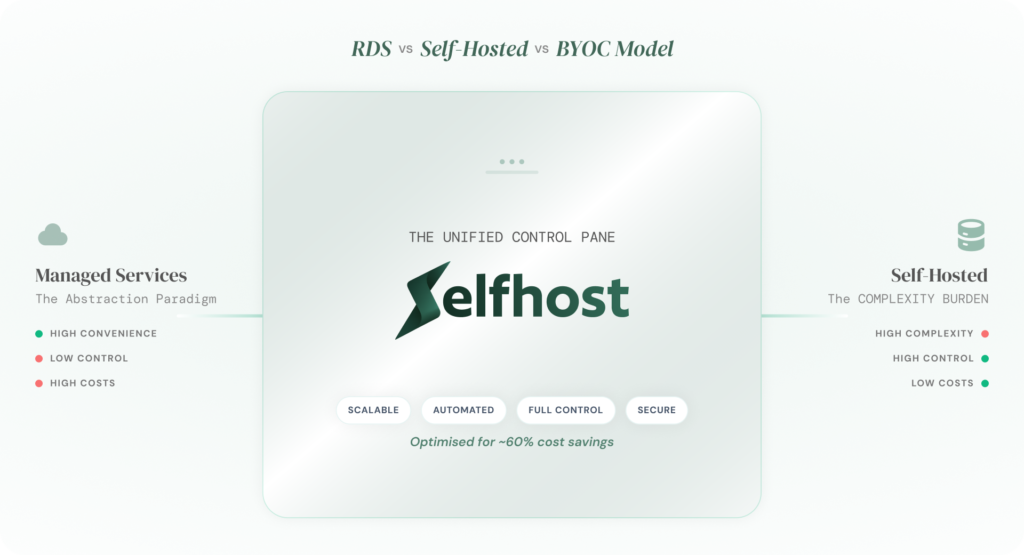
For years, this was the only alternative to RDS. Managed convenience on one side. Full control with full responsibility on the other. Pick one.
That’s no longer the whole picture. For teams evaluating this shift, the real question is how the managed vs self-hosted database trade-offs for growing startups actually play out once you factor in both cost and operational complexity.
Option 3: The model that changes the equation entirely
What if you didn’t have to choose between “pay AWS to manage everything” and “manage everything yourself”?
That’s exactly what the BYOC (Bring Your Own Cloud) model is. Your database runs inside your own cloud account, your AWS, your GCP, your Azure.
You pay cloud-native compute and storage rates directly, with no managed service markup sitting on top. And a platform handles everything else: provisioning, failover, backups, upgrades, and monitoring.
You get the cost structure of self-hosted. Without the operational burden that makes self-hosted painful.
In practice, that means:
- No managed service premium on every GB and every instance hour
- Full visibility into your own infrastructure: no black box
- No vendor lock-in: your database lives in your account, not theirs
- No DevOps hire needed: the platform handles operations for you
This is the model SelfHost.dev is built around. Instead of your data and costs flowing through a managed platform’s infrastructure, everything runs in your own cloud while SelfHost handles the operational layer that used to justify the RDS premium.
Teams that move to SelfHost typically reduce their database infrastructure costs by up to 60%, without removing a single reliability feature.
And there’s something else worth knowing.
SelfHost recently launched an MCP server, meaning your AI coding agent (Claude, Cursor, Windsurf, VS Code) can now talk directly to your managed database without leaving your IDE. Query it, inspect it, migrate it, monitor it, all from inside the tools your team is already using.
For teams already using Claude or Cursor, this means your AI agent can query, inspect, and monitor your database directly without switching tools or writing a single integration.
This is especially worth exploring if you are:
- Spending $800–$1,000/month or more on RDS and watching that number climb
- Running multiple environments and feeling the compounding cost of each one
- Building with AI tools and want your database natively connected to your coding agent
- Done with vendor lock-in and want infrastructure that belongs to your team, not your cloud provider
When It Makes Strategic Sense to Reconsider Why RDS Is Expensive for You
There is no magic number that tells you it is time to reconsider. But there is a pattern.
It starts with someone flagging the database bill in a finance review. Then an engineer spends half a sprint trying to optimise it. Then leadership starts asking why infrastructure costs are scaling faster than revenue. By that point, the question is no longer operational, it is strategic.
This is happening across the industry right now. According to Flexera’s 2026 State of the Cloud Report, 29% of cloud spend is currently wasted, up for the first time in five years. Managing cloud costs remains the number one challenge for 85% of organisations surveyed. Cloud budgets are already exceeding forecasts by 17% on average.
The teams feeling that pressure most acutely are not the ones who made bad decisions. They are the ones whose products grew and whose architecture matured to match. RDS did not get more expensive. The setup did.
Here are the signals that tell you it is time to have that conversation seriously:
- Your RDS bill has become one of the top 3 line items in your cloud spend
- You are running 3 or more environments and feeling the cost of each one
- You cannot predict next month's database bill with any confidence
- Engineering cycles are going toward managing costs instead of building product
- You have data residency or multi-cloud requirements that RDS makes complicated
If you checked two or more of those, you are not alone, and you are not stuck.
One bootstrapped SaaS team was in exactly this position. They did not strip back their architecture. They did not sacrifice reliability. They simply changed the model underneath it and cut their AWS database spend by 60% – how they approached that shift is worth understanding if you’re facing similar cost pressure.
The teams who figure this out early do not do it by working harder on optimisation. They do it by asking a better question, not “how do we reduce this bill?” but “are we on the right model for where our product is today?”
That question, asked early enough, is worth more than any discount AWS will ever give you.
Why AWS RDS Is Expensive Is the Right Question to Be Asking
Final Thought: Why AWS RDS Is Expensive Is the Right Question to Be Asking
You Already Know Why. Now Decide What to Do About It.
Early-stage teams optimise for speed. Growth-stage teams start asking why AWS RDS is expensive. Mature teams optimise for leverage.
The difference between the second and third stage is not technical knowledge. It is timing. The teams that move decisively, that ask the right question before the bill becomes a crisis are the ones that end up with a database strategy that scales with their business instead of fighting it.
You now know exactly whyAWS RDS is expensive. You know which layers compound. You know where optimisation helps and where it hits a ceiling. You know there is a third model most teams never hear about early enough.
The only question left is whether you act on it now or wait until the bill forces your hand.
Frequently Asked Questions: Why is AWS RDS Expensive?
At what monthly spend should I start evaluating alternatives to RDS?
When your RDS bill crosses $300–500 per month or when you are adding Multi-AZ, read replicas, or a staging environment. At this point, the managed service premium becomes a visible line item and the cost gap between RDS and alternatives like BYOC widens enough to justify the evaluation.
Does AWS RDS require DevOps expertise to manage costs?
Not to use it, but yes to optimise it. Right-sizing instances, switching storage types, managing snapshots, and evaluating Reserved Instances all require someone who understands AWS infrastructure. Without that expertise, most teams overpay without realising it.
What are the risks of relying only on AWS RDS?
Vendor lock-in is the biggest risk. Migrating away from RDS means rebuilding backups, reconfiguring networking, and re-testing failover: a process that can take weeks. Cost unpredictability is another risk, as bills compound with each new feature you enable.
Is there an alternative to AWS RDS that reduces cost without adding complexity?
Yes. The BYOC (Bring Your Own Cloud) model runs your database in your own AWS account at cloud-native rates while a platform like SelfHost.dev handles provisioning, backups, monitoring, and failover. You get managed-service simplicity at 40-60% lower cost than RDS.
Is AWS RDS worth the cost for startups?
For early-stage startups building an MVP, yes. The convenience of spinning up a managed database in minutes is worth the premium when your focus should be on shipping product, not managing infrastructure. Reassess once your database bill becomes a noticeable monthly expense.
Why is AWS RDS expensive compared to other database options?
RDS bundles management fees into opaque per-hour pricing that includes a significant markup over raw infrastructure costs. Each production feature, Multi-AZ, read replicas, extended backups, Provisioned IOPS- is billed independently and compounds. The total cost at scale is typically 30–60% more than running the same workload on self-managed or BYOC alternatives.
Is AWS RDS actually expensive?
Yes. AWS RDS typically costs 30–60% more than running the same database on EC2 or through a BYOC provider. The premium covers managed convenience, automated backups, patching, and failover. For early-stage teams, that trade-off is worth it. For growth-stage teams with Multi-AZ, read replicas, and staging environments, the gap becomes significant.
Why does my AWS RDS bill keep increasing?
Because RDS costs compound with every production feature you enable. Multi-AZ doubles your instance cost. Each read replica adds another full instance charge. Backup storage grows silently. Provisioned IOPS are billed separately. Most teams do not notice the compounding until the monthly bill has tripled from where it started.
How much does AWS RDS cost per month?
A basic single-AZ PostgreSQL setup on db.m6g.large in us-east-1 costs roughly $138 per month. Add Multi-AZ, a read replica, a staging environment, and extended backups, and that same setup grows to $700–900 per month. The exact cost depends on instance size, storage, IOPS, and retention settings.
Can I reduce my AWS RDS costs without migrating away?
Yes, up to a point. Right-size your instances, switch from gp2 to gp3 storage, review snapshot accumulation, and use Reserved Instances for stable workloads. These optimisations can save 20-30%. But the managed service premium remains, you cannot optimise your way out of the pricing model itself.
How much does AWS RDS cost per month?
A basic single-AZ PostgreSQL setup on db.m6g.large in us-east-1 costs roughly $138 per month. Add Multi-AZ, a read replica, a staging environment, and extended backups, and that same setup grows to $700- 900 per month. The exact cost depends on instance size, storage, IOPS, and retention settings.
At what monthly spend should I start evaluating alternatives to RDS?
When your RDS bill crosses $300–500 per month or when you are adding Multi-AZ, read replicas, or a staging environment. At this point, the managed service premium becomes a visible line item and the cost gap between RDS and alternatives widens enough to justify the evaluation.